A customer asks for a quote at 4:55 p.m. The inquiry lands in a form, someone copies it into a spreadsheet, and a teammate promises to reply tomorrow. By Monday, nobody knows who owns it.
That is a useful first automation problem. You do not need an AI agent to solve it. You need a lead record, a notification and a visible follow-up deadline.
My preference is to buy the simplest tool that the person responsible for that process can maintain. A lower subscription is a poor saving if the only person who understands the workflow is an unavailable contractor.
This is a documentation-based buying guide, not a hands-on benchmark. I reviewed official pricing and documentation on 18 September 2026, read competing comparisons, and followed original n8n community discussions. I did not connect customer accounts, run this workflow across the three platforms, or measure setup time and reliability. The workflow below is a proposed design, not a tested template.
Start with one shared workflow
Use the same job when comparing the tools:
- Receive a customer inquiry with a submission ID, contact details and request.
- Find or create the lead in your chosen record system.
- Notify the right teammate, linking to that record rather than copying the whole customer message into chat.
- Record an owner, due date and follow-up status. Review overdue items separately.
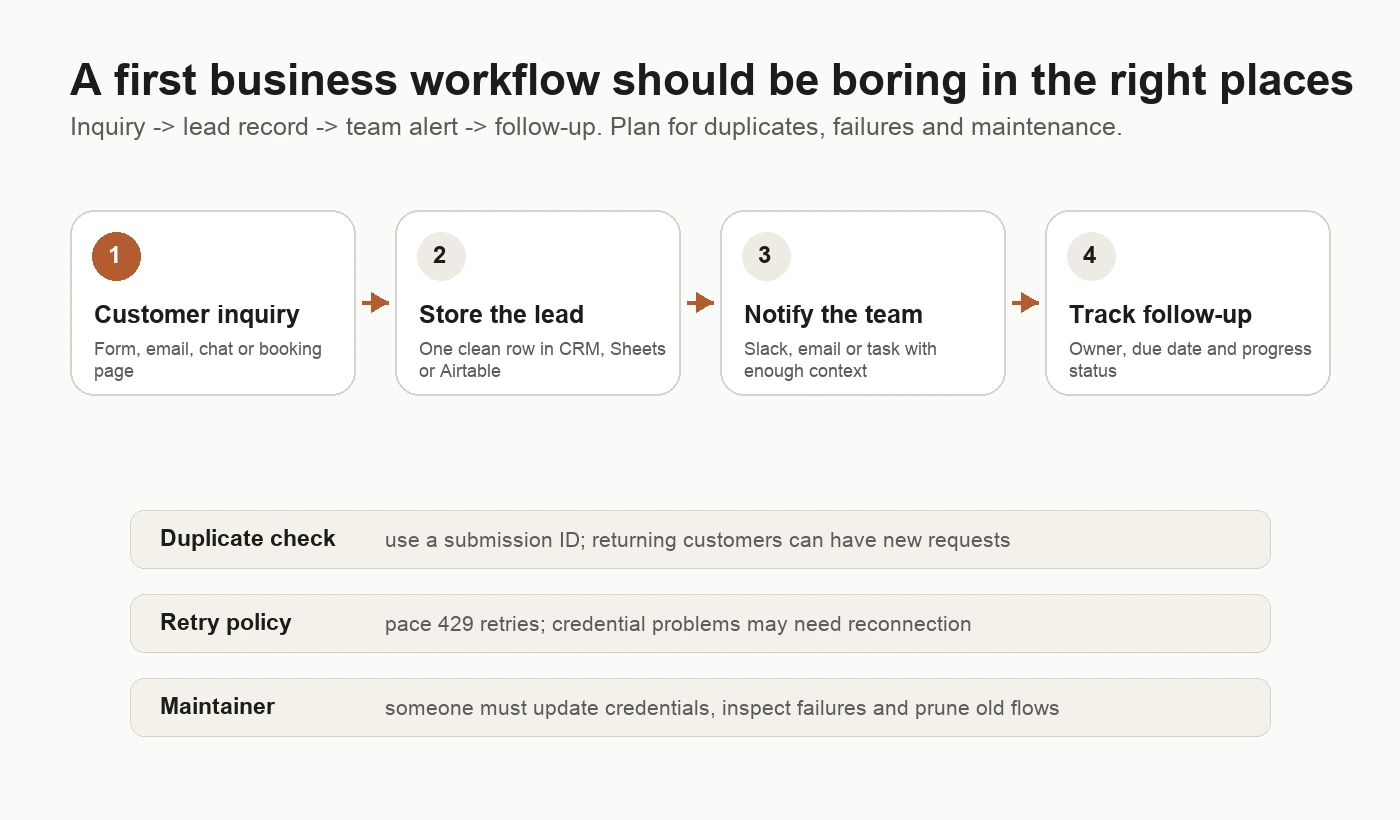
Original editorial diagram: the proposed lead workflow and the responsibilities beneath it. This is not a product screenshot.
For a small business, I would start with whatever record system people already check. Moving the team into a new CRM just to make an automation demo work creates another problem to solve.
Keep the first version narrow. A notification is enough; do not let an unproven workflow send a quote, promise a delivery date or charge a customer. Add those actions only after someone has checked the simpler process.
Decide what counts as a duplicate
A repeated form delivery and a returning customer are different things. Use the form’s submission ID to identify the same event. Use a separate customer ID or normalized email to find the existing contact. A customer submitting a second, genuine request should not disappear because their email already exists.
Store progress against the submission: lead saved, notification sent, follow-up assigned. If notification fails after the lead is saved, recover from that point instead of blindly starting again. Where supported, use an atomic insert or unique constraint on the submission ID. A simple “search, then create” can still race when two copies arrive together.
This is design advice, not a claim that any one platform makes duplicates impossible. Ask the person building the workflow to demonstrate it with the same dummy submission delivered twice.
Which tool suits the person owning it?
Zapier: start here for a familiar app chain
I would shortlist Zapier first for a freelancer or office manager who wants a small sequence of familiar app actions and a clear handover. Its pricing page includes Forms and Tables alongside Zaps; multi-step workflows and webhooks are listed on Professional, while Free is limited to two-step Zaps.[1]
That free-plan limit matters. “Receive inquiry, store lead, notify team, track follow-up” is not a single two-step Zap. You could split a design into separate automations, but that adds handover and debugging work. Do not choose a plan from its price before drawing the actual process.
Check the exact actions you need, not just whether your app’s logo appears in an integration directory. Can it find a lead by your chosen identifier? Update the owner? Return the record link? A missing action can turn a simple design into a custom API job.
Zapier is my recommendation when the owner values a small, readable workflow more than fine-grained control. It is not a promise that every integration will stay connected without attention.
Make: choose it when the branches matter
Make’s official materials describe a visual drag-and-drop builder, scenario inputs and outputs, execution monitoring and subscenarios.[2] I would shortlist it when the owner wants to see how an inquiry moves through several routes: sales requests to one person, support to another, incomplete submissions to a review queue.
The trade-off is that somebody must understand what data travels down each branch. In Make, think in records or “bundles” moving through modules, rather than assuming every canvas box runs once per customer. Multiple results and repeated actions can change usage.
Before committing, have the eventual owner explain a failed example back to you: which module stopped, which data was already written, and what a retry will repeat. If that explanation needs the consultant every time, include continuing support in the budget.
n8n: distinguish Cloud from self-hosting
n8n offers hosted plans as well as a self-hosted Community edition. Its pricing page lists JavaScript/Python code steps and custom API requests; Cloud plans are priced by workflow executions with unlimited steps.[3]
I would choose it when a technical owner needs custom API behavior, data transformation or control over the hosting environment. That person need not write everything in code, but should be comfortable tracing data and reading an API error.
Cloud and self-hosted n8n are different ownership decisions. n8n’s Google credential documentation, for example, provides managed OAuth for supported Cloud integrations, while self-hosted users must configure custom OAuth for this route.[16] Cloud can remove server work without removing workflow work.
For your first business automation, I would not learn server administration and customer-facing workflow design in the same week. Use Cloud or pay someone to maintain the installation if n8n is otherwise the right fit.
Compare bills in the right units
Prices below are a 18 September 2026 research snapshot, not a checkout quote. Currency, billing commitment and usage tier matter. I could retrieve Zapier and n8n’s published plan text directly. Make’s pricing page blocked direct retrieval; a readable copy exposed feature rows but omitted its price cards, so I am not repeating a competitor’s Make price as if I verified it.
| Tool | What I could verify | What to budget for |
|---|---|---|
| Zapier | Free: 100 tasks per month and two-step Zaps. Professional advertised “starting from $19.99/month”; the page offers monthly/yearly billing and several task tiers. The extracted card did not tie that starting figure unambiguously to the selected tier and commitment.[1] | Obtain the quote for your actual task tier and billing period; do not assume the starting price covers your lead volume. |
| Make | Credits are its billing unit. Most fixed-usage modules use one credit per operation; some features have higher fixed rates or dynamic usage.[9] Current plan prices were not independently confirmed here. | Check the official pricing page, selected credit volume, currency and annual/monthly commitment before buying. |
| n8n Cloud | Starter: €20/month billed annually, 2,500 workflow executions per month. Pro: €50/month billed annually, 10,000 executions per month; both advertise unlimited steps.[3] | Separately triggered workflows, scheduled checks and any paid external services belong in the estimate. These are euro prices, not dollar equivalents. |
| n8n Community, self-hosted | The hosting docs describe the Community edition as free without a license key.[5] | Hosting, backups, upgrades, incident response and any external API bills remain your responsibility. Check the license before offering it to clients. |
A small example, not a benchmark
Suppose you receive 200 inquiries per month. Each causes three successful, ordinary external-app actions: save the lead, send a team notification and create a follow-up task. That is an illustrative workload, not measured traffic.
For Zapier, a starting estimate is 200 × 3 = 600 tasks, before additional billable searches or updates. Do not count the trigger as another completed action, or assume all built-in steps bill: Zapier explicitly excludes tools including Filter, Formatter, Paths, Tables, Forms, Delay and Storage from task usage.[1] If you replace an external record action with Tables, the estimate changes. AI, code and other specialized usage deserve a separate check of current rates.
For Make, if those three actions each use one fixed credit per operation and each receives one bundle, they account for 600 credits for those actions alone. That is not the complete scenario bill. Add trigger checks and any other chargeable module work; account for repeated bundles and tests. AI features may consume credits based on tokens or other usage, and custom AI connections can also incur a separate provider bill.[9] Inspect the usage of the proposed modules rather than repeating “every step costs one credit.”
For n8n Cloud, 200 webhook-triggered runs of one workflow suggest 200 executions, rather than 600 because it has three actions. A separate daily follow-up workflow adds 30 or 31 scheduled executions in a month. n8n’s pricing FAQ explicitly counts scheduled runs when estimating production usage.[3] Adding steps does not multiply the advertised execution count, but adding separately triggered workflows can. Confirm replay and retry accounting for the implementation you choose instead of assuming all recovery work is free.
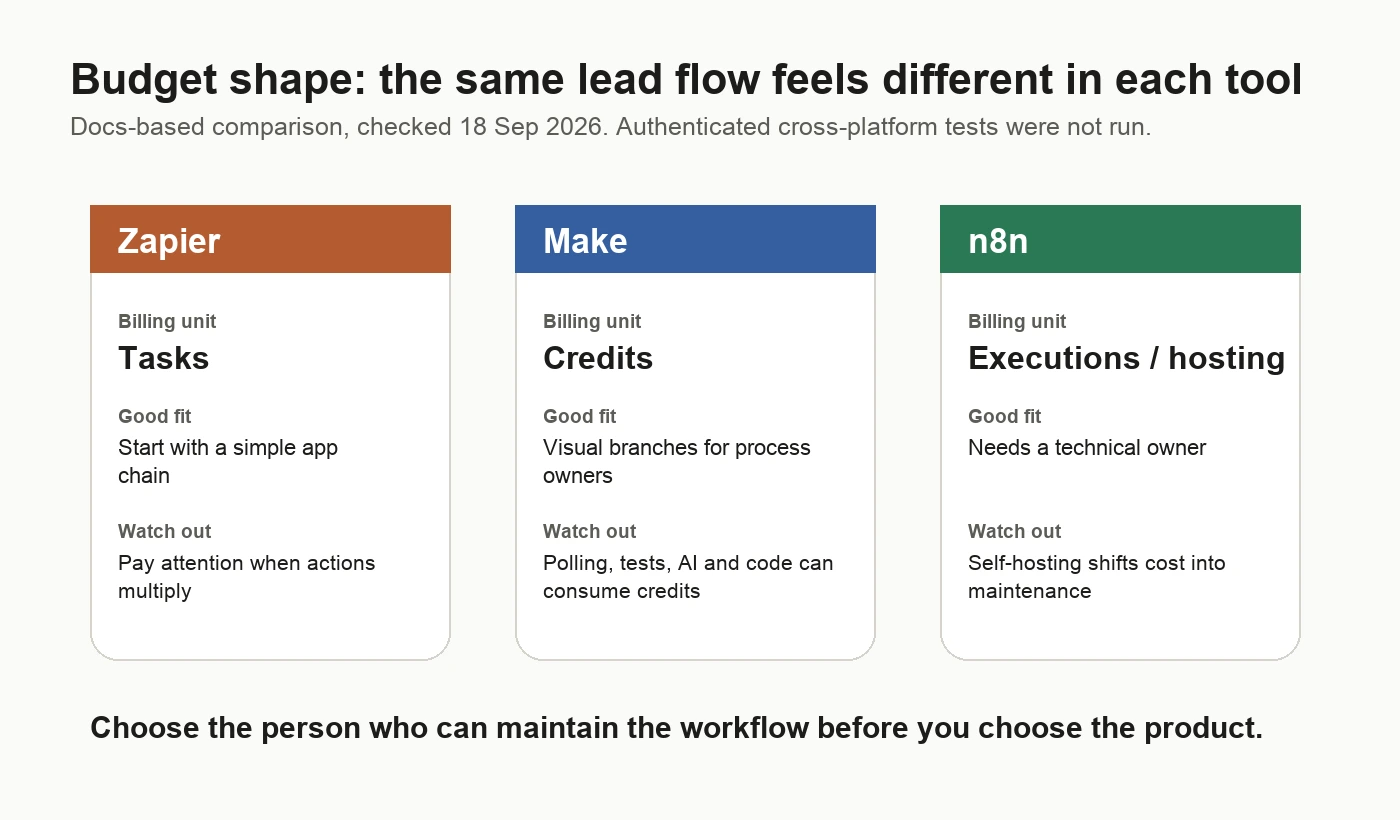
Original editorial diagram: billing units and ownership trade-offs. The fit recommendations are editorial judgments, not measured rankings.
My budget worksheet would have four lines: platform subscription, other app/API subscriptions, initial build cost and ongoing maintenance. Put a name next to the last line. An empty name is a bigger warning than a slightly higher subscription.
Plan for the first failure
A green execution badge is useful, but it is not proof that the customer received a useful outcome. The record might contain the wrong owner, or a branch may finish without creating any follow-up task.
Original community discussions helped identify what to check, not which vendor to declare most reliable:
- In “API Rate Limits in High-Concurrency,” the original poster reports external API 429 responses when several workflows run together. Replies distinguish limiting concurrent work from respecting a requests-per-time-window quota.[12] n8n’s own documentation describes Retry On Fail, batching and Wait nodes as ways to pace requests.[15]
- In “Google OAuth issue,” a user describes trouble authorizing a client’s account; the final reply says publishing the OAuth app from test mode solved their case.[11] That is one person’s resolution, not a universal fix. Official n8n docs separately warn that Google External apps in Testing have consent and tokens expire after seven days.[16]
- A thread about an OAuth failure appearing after 30 days discusses rotating refresh tokens in custom integrations.[17] Do not read the title as “all n8n credentials expire after a month.” Token behavior depends on the provider and authentication setup.
- A Floxer monitoring discussion begins as a product promotion. A participant describes how aggregate monitoring missed a particular account’s persistent failures.[13] I treat that as a useful failure scenario to test, not verified failure-rate data or an endorsement of the monitoring product.
For this lead workflow, define the recovery behavior before turning it on:
| Failure | Proposed response | Person responsible |
|---|---|---|
| Same submission arrives twice | Reuse the existing submission record; do not create a second follow-up task. | Workflow builder verifies deduplication; process owner checks exceptions. |
| API returns 429 or a temporary outage | Wait according to the provider’s guidance, retry within a limit, then send the item to a review queue. | Maintainer checks the provider’s quota and retry settings. |
| Credential expires or access is revoked | Stop the affected action and alert a named owner; do not keep retrying indefinitely. | Account owner reconnects through the approved credential flow. |
| Lead saves but notification fails | Keep the lead and its progress; retry only the unfinished work where possible. | Maintainer reconciles stored state with execution history. |
| Nothing runs when inquiries exist | Compare source submissions with stored leads and assigned follow-ups. | Process owner checks reconciliation, not just error alerts. |
Keep a daily view of unassigned or overdue leads. For a small team, that may be more useful than a complicated monitoring dashboard. Include enough context in an error alert to find the submission, but avoid copying private customer messages or credentials into a shared channel.
Self-hosted does not mean unmaintained
n8n’s hosting documentation distinguishes Community, Business and Enterprise editions.[5] Its repository license permits use for your own internal business purposes or non-commercial/personal use, with additional restrictions on distributing or providing the software.[14] That is not an unrestricted permission to resell hosted access. If you are an agency building an offering around n8n, check the terms with n8n rather than assuming your internal-use setup covers the service you sell.
For an internal lead workflow, the software subscription may be zero on Community, but someone still needs to:
- Keep the server and n8n updated, with a rollback plan.
- Back up the database and protect the encryption material needed to recover credentials.
- Restrict access, manage secrets and decide how long customer data stays in execution logs.
- Monitor availability and confirm that restoring a backup actually works.
- Document who takes over when the original builder leaves.
Those are proposed operating responsibilities, not a claim that I ran a self-hosted reliability test. I would only count self-hosting as a saving after pricing that work.
Read comparisons with their incentives
The What’s Next AI comparison makes a useful point about maintenance, but it also sells custom-coded automation. It describes a path from Zapier to Make to n8n and then to code, and uses broad language about every step billing and paying nothing when self-hosting.[6] Neither is a safe rule for your budget. The official billing exceptions and hosting responsibilities above are more useful than treating that migration path as inevitable.
Zapier’s own comparison pitches Zapier over Make and makes broad claims about implementation speed and reliability.[7] It is useful for identifying questions to ask, but it is a vendor’s sales page, not an independent cross-platform test. I have not used it to establish Make’s current checkout price or to claim that Zapier never needs technical help.
For this first workflow, custom code is not the default destination. A small process that the team understands can stay small. Rebuild when a specific limitation costs more than the change, not because a comparison says serious businesses eventually must.
What I would do this week
Choose one existing inquiry source and one place to store leads. Write down the fields, duplicate rule and person responsible for follow-up. Then shortlist:
- Zapier when a nontechnical owner wants a familiar app sequence and can justify the task-tier quote.
- Make when the owner wants visual branching and is willing to learn the module and credit model.
- n8n Cloud when a technical owner needs its flexibility without operating a server.
- n8n Community when there is a concrete hosting requirement and someone will maintain it.
Before paying annually, test a clean dummy inquiry, a duplicate, a missing required field, a disconnected credential and a failure after the lead is saved. Use isolated test records and a private notification destination. Those are acceptance tests I recommend; they were not run across the products for this article.
Finally, ask the backup owner to find a failed item and explain how to recover it. If they can do that without calling the builder, you have a much stronger reason to buy than an impressive demo.
Sources
[1] https://zapier.com/pricing [2] https://www.make.com/en/pricing [3] https://n8n.io/pricing [5] https://docs.n8n.io/hosting [6] https://www.whatsnext-ai.com/blog/n8n-vs-make-vs-zapier [7] https://zapier.com/blog/zapier-vs-make [9] https://help.make.com/credits [11] https://community.n8n.io/t/google-oauth-issue/313005.json [12] https://community.n8n.io/t/api-rate-limits-in-high-concurrency/312813.json [13] https://community.n8n.io/t/i-built-floxer-to-catch-silent-n8n-failures-and-unusual-workflow-behavior-looking-for-testers/314050.json [14] https://raw.githubusercontent.com/n8n-io/n8n/master/LICENSE.md [15] https://docs.n8n.io/integrations/builtin/handle-rate-limits [16] https://docs.n8n.io/integrations/builtin/credentials/google/oauth-single-service [17] https://community.n8n.io/t/the-oauth-failure-that-only-shows-up-30-days-after-your-workflow-works/314358.json