Browser automation
Jev Ultrafast explained: Browser Use's fast DOM agent and its limits
How Jev Ultrafast combines indexed DOM controls with TypeSafe decisions, what its 7.073-second demo measures, and what our offline checks can prove.
Jev Ultrafast is a small browser-agent project from Browser Use built around a constrained decision loop. It observes the current page, gives TypeSafe’s Jev a set of valid operations and targets, executes the selected action, then observes again. A separate text model supplies field values only when the chosen operation is TYPE_TEXT.8
The headline demo is a Google Flights search in 7.073 seconds. That is a project-reported result with a specific timing boundary, not evidence that the agent can finish arbitrary web tasks in seven seconds. The architecture is interesting even after that qualification.9
This article examines the repository at commit 1231850a0bf1a0c0341fe408ef1668dbbfdfac46. I ran its offline tests and JavaScript syntax checks, but did not make paid model calls or reproduce the live flight search. The distinction matters throughout the speed discussion.
A smaller decision space than arbitrary browser code
A general browser agent may generate selectors, coordinates, or code. Jev Ultrafast instead creates an indexed table of observed controls. Each entry can include a role, label, current value, and supported operations. The set changes with the page.8
An illustrative table might contain a departure-city combobox, a destination combobox, and a search button. The model chooses from those observed items rather than inventing a selector for a button that may not exist. Native select choices also carry an observed element-and-option index.8
The available operation vocabulary includes CLICK, TYPE_TEXT, SELECT, SCROLL_UP, SCROLL_DOWN, WAIT, DONE, and BLOCKED, with only supported operations and targets offered for the current observation.8
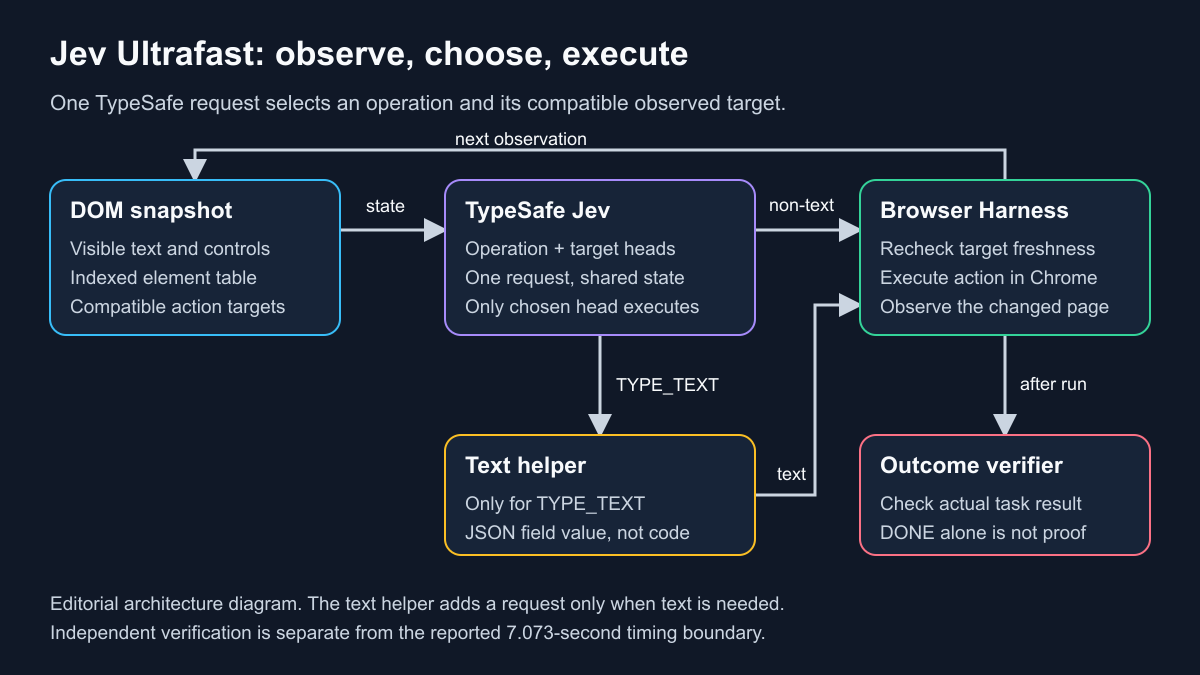
This is an explanatory diagram of the repository’s design, not a screenshot or a measured performance result. The text helper runs only on the text-entry branch.
A constrained output can still be the wrong output. Choosing a real, clickable “Cancel” button instead of “Search” is structurally valid and semantically wrong. The design reduces one class of error; it does not remove the need to check whether the user’s goal was achieved.
Operation and target share one request
The distinctive part is the request construction in model.py. The request includes an operation question and speculative target questions for the supported operation types. Each target head contains only compatible candidates.10
If the operation is CLICK, the executor uses the click target. A simultaneously returned text target does not get executed. This avoids a serial “choose the operation, then ask another model call which element” sequence: the operation and compatible target are decided in one TypeSafe network round trip.8
That does not mean every action needs only one model request in total. When the selected operation is TYPE_TEXT, another model call generates the string to enter. The helper receives the goal, field context, page context, and recent actions; its output must parse as a small JSON object containing a valid text value.10
The README’s example configuration uses an OpenRouter key and inception/mercury-2.5 with reasoning disabled. The helper code also has its own fallback configuration, so anyone reproducing measurements should pin the endpoint, model, and reasoning settings rather than assuming “the default” is unambiguous.8
What the browser layer does
Chrome is connected through Browser Harness. The default agent loop uses structured page state rather than screenshots; the inspector can opt into screenshots, while the demo recording uses a separate screencast.8
The repository attributes several runtime improvements to browser work rather than a new reasoning model:8
- A snapshot gathers common visible HTML and ARIA controls in one browser call and retains references to actual DOM nodes.
- Click guards check the document, form state, selected target, and nearby context without invalidating every decision merely because an unrelated animation occurred.
- The executor resolves current geometry and rejects covered targets before input.
- After typing in a combobox, the browser can wait briefly for visible suggestions instead of immediately asking the model to choose from an incomplete popup.
- Visible text is preferred over filling the context with offscreen article bodies and footers.
Model output does not become arbitrary JavaScript, shell commands, selectors, or coordinates. The executor maps the chosen operation back to an observed action and applies its guards.8 That boundary is useful, but it is not a complete security policy: a permitted click can still submit a form or change an account.
What the 7.073-second claim actually includes
The performance report says timing begins at the first prediction after the initial homepage observation and ends at the accepted DONE choice. Model calls, generated city strings, browser work, stale decisions, and loading waits are inside the clock. Browser setup, initial navigation, and fresh independent post-run verification are outside it.9
That last distinction prevents an easy misreading: “verified completion” describes the outcome of the run, but the separate verifier’s execution time is not part of the quoted 7.073 seconds.
The recorded run used 17 Jev requests, two text-helper calls, ten interactions, and one explicit WAIT. Search executed at 5.217 seconds; the remaining timed interval included results loading, state changes, and the completion decision. The video’s final half-second hold is a presentation detail, not additional agent work.9
These are the project’s measurements, not ours. They show a specific workflow with useful timing transparency. They do not establish a typical latency for checkout, data extraction, enterprise dashboards, or sites with different controls.
The 25% improvement is a small matched comparison
The authors also report six alternating runs, split between an original and an optimized runtime. Both used the same goal, model settings, viewport, action/request budgets, and independent result checker on one existing Chrome profile.9
| Project-reported measure | Original runtime | Optimized runtime |
|---|---|---|
| Median task time | 9.450 seconds | 7.092 seconds |
| Verified attempts | 3 of 3 | 3 of 3 |
| Median TypeSafe requests | 22 | 17 |
| Median browser protocol calls | 1,092 | 101 |
The reported median time reduction is 25.0%. This compares two versions of this runtime, not Jev against every browser agent or against the full Browser Use product. Initial navigation was excluded in both arms.9
Three pairs are too few to support a broad reliability or speed claim. The report itself gives a two-sided sign-test value of p = 0.25 and notes that network responses, routing, Google, and caches remain live. A result of 3/3 should be read as “all three attempts passed,” not “100% reliable.”9
Two additional results, 2.798 seconds for opening a Wikipedia article and 1.896 seconds for a local hotel-filter fixture, are separate smoke checks. They are not matched comparisons, and the local fixture is not equivalent to an unpredictable public booking site.9
The report also retains development failures, including a fast direct-DOM candidate that failed outcome verification because name/value extraction was incomplete. That is a useful reminder that a shorter time is not automatically an improvement.9
Cheap text generation is not total task cost
For the recording, OpenRouter reported $0.00006272 for the two text-helper calls. The performance report explicitly says this is not the total task cost: TypeSafe responses contain token counts without a billed dollar amount, and browser costs are excluded.9
Do not turn that number into “a flight search costs a fraction of a cent.” A meaningful budget needs TypeSafe charges, text-model charges, browser infrastructure, failed attempts, and any verification or orchestration overhead. The repository does not supply enough billed data to establish that total.
What we checked locally
For this article, I cloned the repository at the commit named above into a temporary directory and ran:
uv sync --frozen
uv run pytest
node --check jev_ultrafast/snapshot.js
node --check jev_ultrafast/static/app.js
The offline suite collected 31 tests and all 31 passed on macOS with Python 3.14.3. Both JavaScript syntax checks exited successfully. The test suite covers contract and guard behavior, including helper validation and trip-verification logic; it is not a live web benchmark.11
I did not run the paid examples, connect the agent to a personal Chrome session, or measure browser-action latency. Passing these tests provides evidence that the checked code satisfies its offline test cases. It does not independently reproduce the advertised timing or demonstrate general web reliability.
Where the current MVP stops
The README and performance report describe a DOM reader for common HTML and ARIA controls, not a complete implementation of the accessible-name specification. Shadow roots, frames, canvas interfaces, uploads, pop-up or new tabs, nested scrolling, and arbitrary keyboard widgets are outside the stated MVP scope.8
Those limitations matter in ordinary work. A payment flow may enter an iframe, a design tool may render controls on canvas, and an admin application may depend on a custom keyboard widget. A workflow that encounters one of those should be evaluated as unsupported rather than rescued by a marketing claim about speed.
Owned tabs also share the existing Chrome profile.8 Before using a live agent, consider the accounts and cookies that profile exposes. Use a dedicated test profile or isolated environment you have deliberately configured, avoid sensitive accounts, and review what page content will be sent to model providers. A local browser connection does not imply local inference.
For consequential actions, add explicit approval and an independent result check. DONE is the policy’s opinion about completion. The repository itself warns that it is not independent evidence of success.8
How to evaluate it without fooling yourself
I would choose a low-risk, read-only workflow first and define the expected outcome before running it. For a flight search, that means checking the route, date, passenger/cabin settings, trip type, and actual visible results rather than accepting a final chat message.
Keep a complete record of attempts, including provider errors, blocked states, wrong outcomes, and timeouts. Pin the repository revision and model configuration. Report cold-start and post-observation timings separately if both matter to users. Compare success rates and cost per verified task alongside latency.
The repository’s setup requires Python 3.12 or newer, its uv environment, Browser Harness/Chrome connectivity, a TYPESAFE_API_KEY, and a text-model key for text-entry tasks. The README offers an inspector at http://127.0.0.1:8766, including a “Choose next” mode that pauses before execution. Live examples make paid API calls; offline tests do not.8
Jev Ultrafast is worth reading if you build browser agents and want a concrete example of reducing serial model decisions and browser-protocol overhead. It is not yet a reason to replace a stable deterministic script for a fixed workflow, nor a basis for promising seven-second completion across the web.
If you control the application and want users to interact with an embedded assistant instead, the companion CopilotKit explainer covers that architecture. CopilotKit connects an agent to your app’s UI and tools; Jev Ultrafast operates a browser against observed web controls.
Sources
8 https://github.com/browser-use/jev-ultrafast/blob/1231850a0bf1a0c0341fe408ef1668dbbfdfac46/README.md
9 https://github.com/browser-use/jev-ultrafast/blob/1231850a0bf1a0c0341fe408ef1668dbbfdfac46/docs/performance.md
10 https://github.com/browser-use/jev-ultrafast/blob/1231850a0bf1a0c0341fe408ef1668dbbfdfac46/jev_ultrafast/model.py
11 https://github.com/browser-use/jev-ultrafast/blob/1231850a0bf1a0c0341fe408ef1668dbbfdfac46/tests/test_agent.py