AI development
CopilotKit explained: when your website needs an in-app AI assistant
What CopilotKit does, how its runtime and AG-UI fit together, practical Astro use cases, licensing boundaries, and when ordinary search is better.
A visitor reading a blog rarely needs an AI agent. A customer trying to understand an account dashboard, change a complex configuration, or assemble a shortlist might. That distinction is where CopilotKit starts to make sense.
CopilotKit is a toolkit for putting an agent inside an application: chat surfaces, UI state, tools the agent can invoke, and interfaces that can ask a person to approve the next step. It is not GitHub Copilot, a website generator, or a browser bot that automatically learns how every button on your site works.1
My recommendation is to start with a specific interaction that is awkward today. If you cannot name one, adding a chat bubble probably creates more maintenance than value.
What CopilotKit actually connects
The architecture documentation describes three layers. The frontend renders the conversation and exposes appropriate application capabilities. A runtime endpoint brokers requests, authentication, tool calls, and streamed events. An agent backend does the reasoning and uses tools. AG-UI is the event protocol connecting those pieces.2
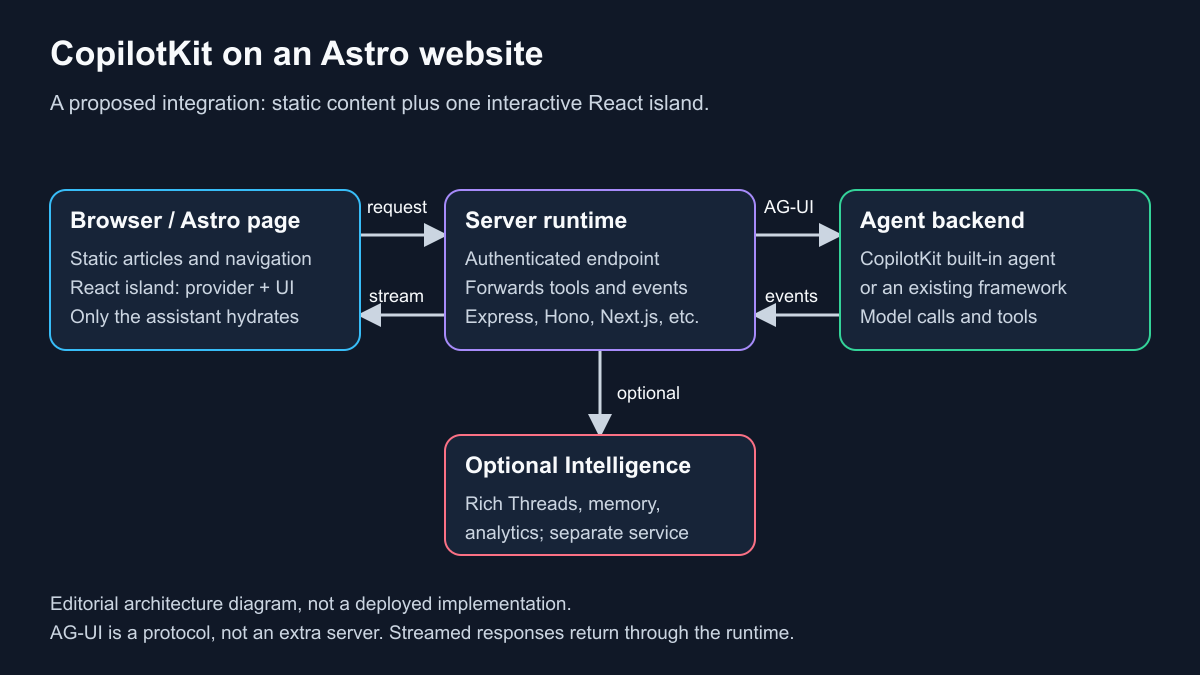
An editorial architecture illustration, not a screenshot of a deployed CopilotKit installation. The static site still needs a server endpoint for the assistant.
The runtime can live in a server such as Express, Hono, or Next.js. The agent can be CopilotKit’s built-in agent or an existing compatible backend, including LangGraph, Mastra, and other documented integrations. Choosing the built-in agent is not a requirement for adopting the UI.2
That matters if you already have useful agent logic. The current quickstart explicitly warns that registering BuiltInAgent as the default replaces the agent the chat talks to; it does not magically connect your existing one. Use the integration guide for your backend instead.4
There is also a difference between the agent describing an action and your application performing it. A convincing sentence saying “I updated your settings” proves nothing. Your application needs an explicit tool, permission checks, an execution result, and a UI that reflects the actual result. CopilotKit provides interaction plumbing; product rules remain your responsibility.
Four website uses worth considering
These are proposed product designs, not features installed on this site or results from a hands-on CopilotKit deployment.
A comparison assistant that controls a real shortlist
On a review site, a visitor could ask for “quiet wireless keyboards under my budget, with a compact layout.” Rather than returning a generic paragraph, an assistant could call a controlled search tool, display matching items, and update a comparison panel.
The useful part is the connection to your actual catalog. Product identifiers, current availability, source links, and filter values should come from your data layer. Do not let the model invent a product card, assume an old price is current, or turn an affiliate commission into an invisible ranking signal.
CopilotKit’s frontend tools and generative-UI primitives are designed for this kind of connection between agent activity and application UI.3 Whether it beats a well-designed filter form is a question for user testing, not a feature checklist.
An account assistant with read-only access first
A SaaS dashboard might explain why a report changed, identify which filter is active, or help someone locate a record. Start with read-only tools and the smallest useful slice of account data.
Only after that works would I add write operations. For a settings change, show the old and proposed values and require confirmation. For refunds, invitations, or bulk edits, enforce authorization on the server even if the frontend already hides the button. A conversation must not become a way around the permissions of the ordinary interface.
A form helper that proposes rather than submits
A long onboarding form is a reasonable place for an assistant to explain fields and draft answers. Keep the editable form visible, let the user inspect changes, and leave final submission under their control.
This is a better starting point than an assistant allowed to execute an entire onboarding workflow without interruption. It gives you a clear success criterion: fewer mistakes or less completion time, measured against the existing form.
An internal editorial assistant
For a content team, an assistant could find related articles, suggest internal links, or assemble a draft from approved source material. I would keep publishing behind a separate human approval step and make the source documents visible beside each factual suggestion.
A writing assistant does not become a fact-checker because it runs inside your CMS. Retrieval, citation checking, and publication permissions are separate systems you still need to design.
Can it fit an Astro site without a Next.js migration?
Yes, as an integration approach. Astro supports React components as hydrated islands, while CopilotKit’s React UI can connect to a standalone runtime. The current CopilotKit quickstart uses Next.js for convenience, not because the entire website must run on it.4
For a mostly static Astro site, I would keep the article pages static and place the assistant in one React component tree. That tree would contain the provider, the chat surface, and the React components or state the assistant needs to control. Do not assume wrapping static .astro markup makes its state available to React hooks.
An implementation plan would look like this:
- Confirm the Astro React integration exists and choose one page or tool for the pilot.
- Create a React assistant island with the CopilotKit provider and chat UI. The current quickstart uses
@copilotkit/react-core/v2, including its stylesheet; avoid mixing older examples with the current API.4 - Select an appropriate Astro hydration directive.
client:loadhydrates on page load;client:visiblewaits for visibility;client:only="react"skips server rendering. Pick based on the component’s needs rather than loading assistant JavaScript on every article by default.12 - Deploy a real runtime endpoint. A static build does not create a running
/api/copilotkitservice. Use a separate backend with an absolute runtime URL, a same-origin proxy, or a deliberately configured server deployment.4 - Expose one narrow tool and a small, explicit context object. Add authentication, error handling, request limits, and evaluation before expanding access.
This is an architectural proposal, not a copy-and-paste Astro integration tested for this article. In particular, streaming, proxy buffering, browser credentials, and cross-origin configuration need checking on the host you actually use.
The site should remain usable if the agent is unavailable. Keep ordinary navigation, filters, and forms; show a useful error instead of trapping visitors in a broken chat experience.
Open source does not mean every service is free
The open-source SDKs and runtime are MIT-licensed. They cover chat, frontend tools, agent state, generative UI, and AG-UI integrations without requiring a CopilotKit-operated service.3
CopilotKit Intelligence is a separate backend offering. Its documented capabilities include Rich Threads, User Memories, Automatic Learning, Product Analytics, and channel connections. Intelligence and Showcase have separate terms; the repository’s MIT badge should not be read as the license for every CopilotKit product.1
You can also retain conversation history using your own storage or a framework’s persistence mechanism. Intelligence is an option for a more integrated service, not the only possible way to remember a conversation.3
Self-hosting Intelligence is a different operational commitment from installing the open-source runtime. The Kubernetes guide requires a valid Intelligence license key and infrastructure including PostgreSQL, Redis, ingress, and identity configuration. Do not budget it as an unlicensed Docker container you can run for free.6
Even an open-source-only implementation has costs: model calls, runtime hosting, storage if needed, abuse controls, and your time maintaining it. This article does not quote a subscription price because the right cost comparison depends on the service tier and workload.
Authentication deserves its own acceptance tests
The authentication guide is unusually important reading before a public launch. A thread ID is an identifier, not proof that a caller owns the conversation. Without Intelligence, thread ownership and scoped listing are application responsibilities; swapping an in-memory runner for durable storage does not itself add authorization.5
For Intelligence, the documentation distinguishes identifyUser, which names the caller, from onRequest, which can authenticate every request before routing. It explicitly warns that identifyUser is not a universal authentication gate and describes additional ownership guards for threads/events and threads/state.5
For a deployment, I would test at least these cases:
- An unauthenticated request cannot start an agent run or read stored activity.
- User A cannot fetch, rename, delete, inspect, or continue user B’s thread.
- A frontend-provided user ID cannot replace the server’s verified identity.
- A tool refuses an unauthorized operation even when the model asks for it.
- API keys stay on the server, and logs do not casually retain sensitive prompts or account data.
Page content, uploaded documents, and model responses should be treated as untrusted input. Keep destructive actions narrow, validate tool arguments, and ask for approval where the consequence warrants it. A human-in-the-loop component is useful only if the surrounding application actually enforces the approval boundary.
When I would leave CopilotKit out
For a small blog, portfolio, or landing page, normal navigation and search will usually be cheaper and easier to understand. For a support FAQ, first ask whether users need an agent that takes actions or just a reliable way to find a documented answer.
For a fixed operation such as downloading an invoice, an ordinary button is likely better than asking a model to decide which tool to call. For a one-off private automation, you may not need an embedded frontend at all.
CopilotKit becomes more compelling when an application already has meaningful state and actions, users need help navigating them, and a team can maintain the backend and permission model. It is much less compelling as decoration on an otherwise finished static website.
A sensible first experiment
Choose one read-only task, give it an explicit success condition, and compare it with the existing interface. For a product finder, measure whether people reach a relevant shortlist and whether every recommendation points to a real catalog entry. Track failures and cost per completed task, not just the number of chat messages.
This article is based on the linked project and documentation reviewed on September 24, 2026. No live model benchmark or production CopilotKit installation was performed. The Astro design is a proposed integration, and the security checklist is implementation guidance rather than an audit of a running service.
If your goal is instead to automate someone else’s website through Chrome, read the companion Jev Ultrafast architecture and speed-claims explainer. That is a different problem from embedding an assistant in an application you control.
Sources
1 https://raw.githubusercontent.com/CopilotKit/CopilotKit/main/README.md
2 https://docs.copilotkit.ai/concepts/architecture.md
3 https://docs.copilotkit.ai/concepts/oss-vs-enterprise.md
4 https://docs.copilotkit.ai/quickstart.md
5 https://docs.copilotkit.ai/auth.md
6 https://docs.copilotkit.ai/intelligence/self-hosting.md
12 https://github.com/withastro/docs/blob/main/src/content/docs/en/guides/framework-components.mdx