HOANGHIEP.SITE

Hardware & Phone

Gaming & Desk Setup

  • Esports Mice
  • Custom Keyboardssoon
  • OLED Monitorssoon
  • Ergonomic Chairssoon

Head-to-head comparisons · Updated September 2026

Head-to-Head Tech Verdicts: Concise, Accurate, Worth Every Cent

Skip the fluff. A 30-second Bottom Line on every showdown, side-by-side measurements you can check, and deal prices we re-verify before we publish.

100% Independent TestingRetail-purchased unitsHands-On TestingUsed, not just spec-sheetedPrices CheckedAt publication, and dated
+7

Hardware & Phone

Gaming & Desk Setup

  • Esports Mice
  • Custom Keyboardssoon
  • OLED Monitorssoon
  • Ergonomic Chairssoon
Flagship foldables
Manufacturer specifications · September 2026

iPhone Duo vs Galaxy Z Fold8 Ultra vs Huawei Mate XT 2: The Crease Matters

Apple’s first foldable meets Samsung’s current Ultra and Huawei’s flagship tri-fold. How their hinges, screen layers and reflections change the crease debate.

The 30-second verdict

Galaxy Z Fold8 Ultra is the practical starting point for a premium everyday foldable; Huawei Mate XT 2 is the ambitious tablet-sized alternative. iPhone Duo brings a nano-texture inner screen and iOS to the comparison, but does not arrive until October. There is no defensible crease winner yet: a quieter reflection, a shallower groove and a longer-lasting panel are three different achievements.

For iPhone users

iPhone Duo

A book-style foldable for the Apple ecosystem

iPhone Duo

Apple · Open inner display

  • Nano-texture inner display targets glare, a key part of crease visibility
  • Two-app Split View brings a practical use for the larger iOS screen
  • One folding line rather than the two of a tri-fold
  • Not available until October 23 on the US launch schedule
  • 254 g is heavier than the 215 g Galaxy Z Fold8 Ultra
  • Apple’s smooth-and-flat claim does not establish long-term crease behavior
Everyday shortlist

Galaxy Z Fold8 Ultra

The current top-tier Galaxy book foldable
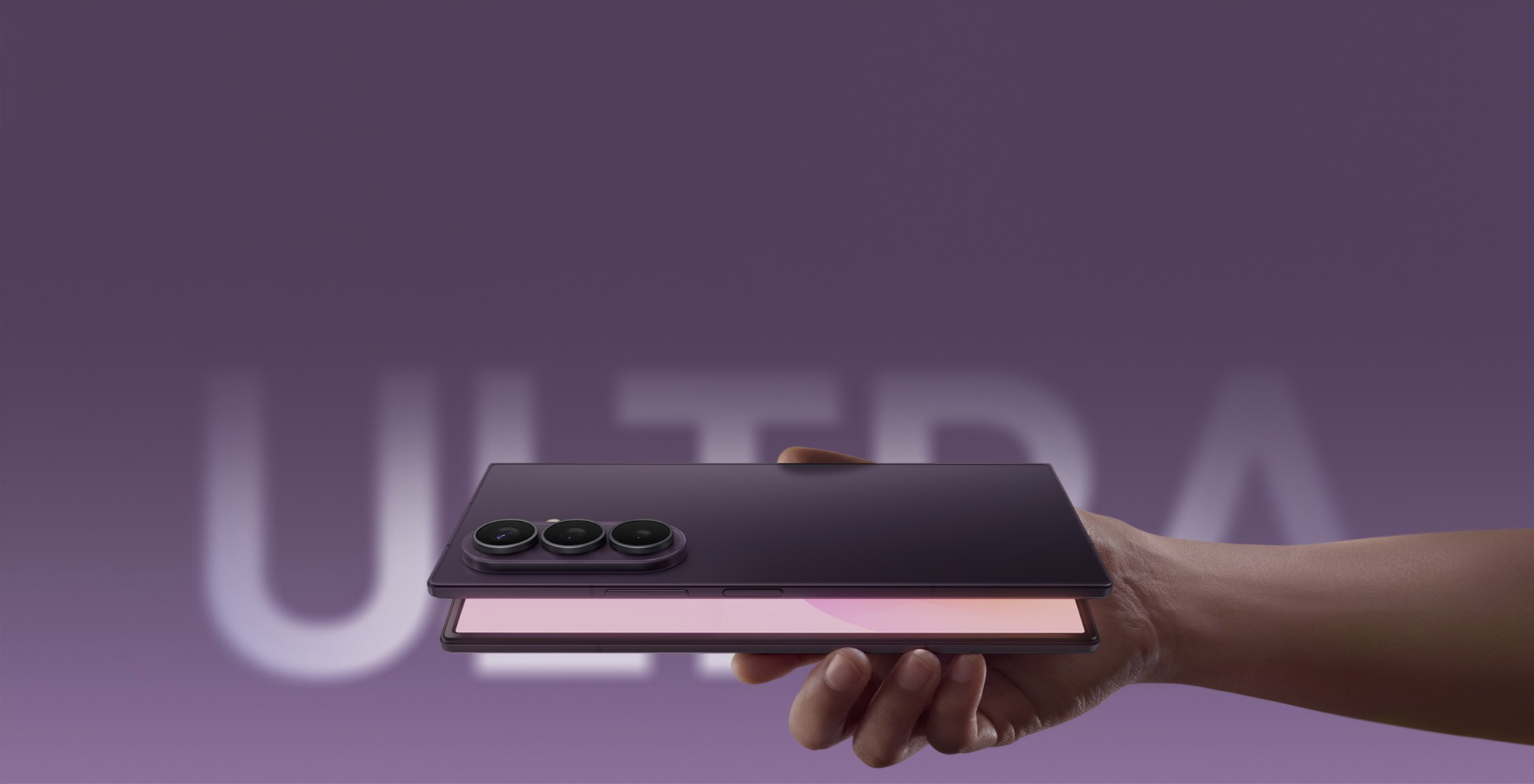
Galaxy Z Fold8 Ultra

Samsung · Partially open rear view

  • Anti-reflection on the main screen addresses distracting glare
  • Dual titanium support layers underneath the display
  • An 8-inch workspace in a manufacturer-stated 215 g device
  • No S Pen support, despite the large canvas
  • IP48 is not a dust-tight rating
  • Positive owner crease reports are not a controlled comparison
Largest workspace

HUAWEI Mate XT 2 Ultimate Design

Top 2 TB stylus bundle with privacy display, China specification

HUAWEI Mate XT 2 Ultimate Design

Huawei · Three-section design; configuration not shown

  • 10.2-inch inner display offers a substantially larger working canvas
  • Top stylus bundle combines 2 TB storage with a 120 Hz privacy inner panel
  • UTG and a high-strength steel support layer form part of the inner-screen structure
  • Two folding regions to inspect and a prescribed closing sequence
  • About 304 g including the screen surface layer
  • China-market apps, service coverage and carrier compatibility need checking abroad

Published folding hardware

Apple and Samsung US pages; Huawei China specifications, checked September 10, 2026. These are manufacturer descriptions, not independent durability results.

FeatureiPhone DuoGalaxy Z Fold8 UltraMate XT 2 top bundle
Hinge descriptionTitanium hinge cover; internal geometry not detailedArmor FlexHingeSecond-generation hinge; gearless synchronized linkage
Inner panel / supportOLED; 10 ultrathin layers; optically clear adhesivesDual titanium shock-absorbing support layersFlexible OLED, UTG and high-strength steel support
Optical treatmentNano-texture inner finishMain-screen anti-reflectionPrivacy inner display in selected configurations
Unfolded body thickness5.2 mm4.1 mm4.0 / 3.69 / 3.5 mm by section
Published ingress ratingIP68IP48IP58 and IP59
Crease depth, same methodNot establishedNot establishedNot established

Read the full showdown

Apple Pro upgrade guide
Apple specifications · September 2026

iPhone 18 Pro vs iPhone 17 Pro: Is Variable Aperture Worth the Upgrade?

The new Pro adds a variable-aperture camera, stronger sustained-performance claims and faster charging. Why a healthy iPhone 17 Pro still makes sense.

The 30-second verdict

Keep a healthy iPhone 17 Pro unless its camera or long-session performance is holding you back. iPhone 18 Pro’s variable aperture is a meaningful new creative tool, but not proof that every photo improves. Apple’s battery figures rise modestly for the smaller Pro; its headline six-hour gain belongs to Pro Max. Wait for matched retail tests before paying for a promised performance advantage.

For deliberate camera work

iPhone 18 Pro

A more flexible main camera, not a compulsory annual upgrade

iPhone 18 Pro

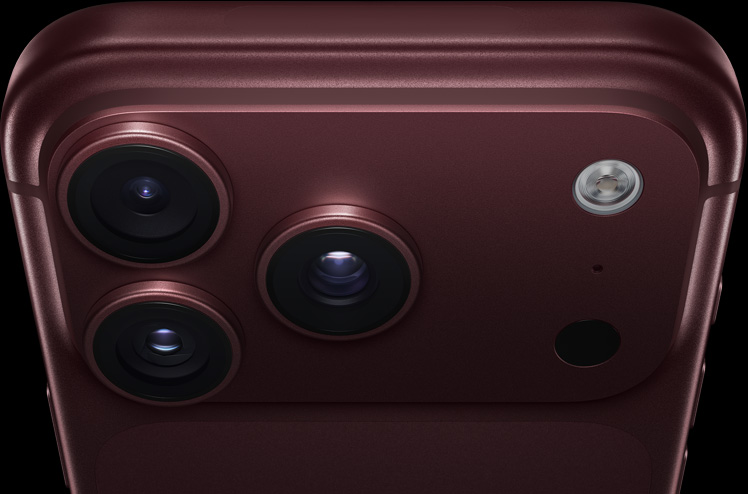
Apple · Burgundy rear camera detail

  • Four physical aperture settings on the main camera, with Pro controls
  • Apple claims improved sustained performance with A20 Pro and revised cooling
  • Higher published battery ratings and faster wired top-ups
  • Matched retail camera and thermal results are not established here
  • Fastest charging needs an AVS-compatible adapter and suitable cable
  • The headline six-hour video gain is for Pro Max, not this model
Keep if it meets your needs

iPhone 17 Pro

The sensible default if you already own one

iPhone 17 Pro

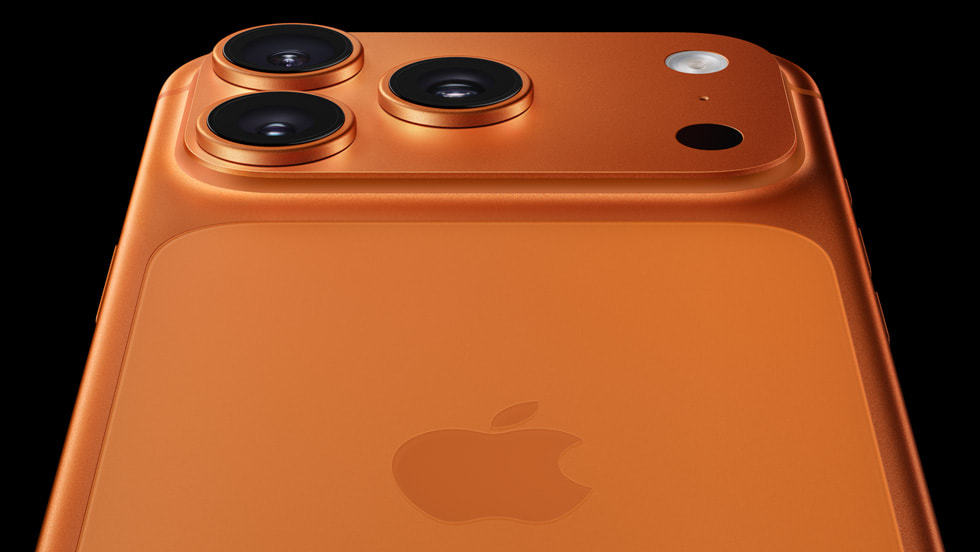
Apple Newsroom · Orange rear camera detail

  • Already has vapor-chamber cooling, ProMotion and three 48MP rear cameras
  • Already supports ProRAW, Apple Log 2 and external 4K/120 ProRes recording
  • Keeping it avoids a new purchase and preserves familiar accessories
  • Fixed main-camera aperture cannot offer the new optical depth control
  • Lower Apple battery ratings and slower specified wired half-charge
  • A worn battery can undermine the experience even if the processor is sufficient

The hardware that changes—and stays

Apple US/Vietnam specifications and Apple Support, checked September 10, 2026. Manufacturer specifications, not our benchmarks.

FeatureiPhone 18 ProiPhone 17 Pro
ProcessorA20 Pro · 6-core CPU · 7-core GPUA19 Pro · 6-core CPU · 6-core GPU
CoolingNext-generation vapor chamberVapor chamber
Main camera48MP · 24 mm · variable aperture48MP · 24 mm · fixed ƒ/1.78
Telephoto48MP · 100 mm (4x) · ƒ/2.848MP · 100 mm (4x) · ƒ/2.8
Display6.3-inch OLED · ProMotion up to 120 Hz6.3-inch OLED · ProMotion up to 120 Hz
Streamed video, US / VietnamUp to 33 / 31 hoursUp to 30 / 28 hours
US SIM configurationDual eSIM; no physical SIMDual eSIM; no physical SIM
Vietnam SIM configurationnano-SIM + eSIM; dual eSIM supportednano-SIM + eSIM; dual eSIM supported

Read the full showdown

Apple buying guide
Apple specifications · September 2026

iPhone 18 Pro vs iPhone 18 Pro Max: More Battery, Not More Camera

The Pro Max buys a bigger screen and longer Apple-rated endurance, but adds 38 grams. How size, shared cameras and the C2 modem caveat should guide your choice.

The 30-second verdict

Choose iPhone 18 Pro for easier everyday handling without giving up the published Pro camera system. Choose Pro Max when its larger screen and longer Apple-rated battery life solve a real problem. It is 38 grams heavier before a case. Apple names the C2 modem on the smaller Pro but does not name the Pro Max modem on these specification sheets; that is not evidence that either gets better reception.

For everyday portability

iPhone 18 Pro

The full published camera feature set in the smaller body

  • Narrower body and 38 grams less weight than Pro Max
  • Same listed rear cameras, variable aperture and front camera
  • Same A20 Pro chip and storage choices up to 2TB
  • Lower Apple battery ratings in both US and Vietnam
  • Less screen space for reading and framing video
  • C2 branding does not establish a reception advantage
For long days away from power

iPhone 18 Pro Max

More viewing room and a larger endurance margin

  • Higher Apple-rated typical use and video playback
  • 6.9-inch display with the same listed pixel density as Pro
  • No need to sacrifice the shared camera or Pro video tools
  • 249 grams before adding a case or accessories
  • Wider and taller body demands more reach
  • No exclusive camera upgrade in the published specifications

Published differences and common ground

Apple US/Vietnam specifications checked September 11, 2026. Manufacturer data, not measured performance.

SpecificationiPhone 18 ProiPhone 18 Pro Max
Height × width × depth150.0 × 71.9 × 8.75 mm163.4 × 78.0 × 8.75 mm
Weight211 g249 g
Display6.3-inch OLED · 460 ppi6.9-inch OLED · 460 ppi
Refresh / outdoor peakUp to 120 Hz / 3000 nitsUp to 120 Hz / 3000 nits
Video playback, US / VietnamUp to 36 / 34 hoursUp to 45 / 43 hours
Streamed video, US / VietnamUp to 33 / 31 hoursUp to 40 / 38 hours
Chip / storage optionsA20 Pro / 256GB, 512GB, 1TB, 2TBA20 Pro / 256GB, 512GB, 1TB, 2TB
Cellular modem named by AppleApple C2Not named on these sheets
Wireless networkingApple N1 · Wi-Fi 7 · Bluetooth 6Apple N1 · Wi-Fi 7 · Bluetooth 6

Read the full showdown

AI Coding Tools
Docs checked 7 Sep 2026

GLM Coding Plan vs Claude Code vs OpenAI Codex: Which AI Coding Tool Should Builders Use?

GLM Coding Plan, Claude Code and OpenAI Codex compared for real-world coding workflows, agentic tasks, team fit, pricing, and the latest benchmark snapshots.

The Bottom Line (30-Second Verdict)

GLM Coding Plan is the cheapest-looking way in if you want broad tool support and are already comfortable using AI coding inside your editor or agent workflow. Claude Code is still the easiest all-around pick for most builders because it feels the most polished in day-to-day use. OpenAI Codex is the conservative enterprise-safe option if you want something tied tightly to the OpenAI stack and don't mind a more structured workflow.

Best value entry

GLM Coding Plan

GLM-5.3 / 5.3-Flash / 5.2 / 5-Turbo for agents, IDEs and coding workflows

8.5/10

Wide tool support

Public positioning
AI coding for agents and IDEs
Public price language
Plans from $18/month
Tool support
Claude Code, Codex, Cline, OpenCode, Clawdbot/OpenClaw and more
Model family
GLM-5.3, GLM-5.3-Flash, GLM-5.2, GLM-5-Turbo
  • The public page is unusually direct: it tells you the plan is meant for agents and IDEs, not just chat
  • It plugs into a lot of existing coding surfaces, which is handy if you already live in tools like Claude Code or Cline
  • The benchmark image shared in this chat shows GLM-5.3 making a real jump over GLM-5.2 on tool-use style tests
  • If the pricing really lands where the page suggests, it is easier to justify for students and indie builders than a top-tier premium stack
  • The pitch is broad enough that it can feel a bit 'platform-like' rather than opinionated about one killer workflow
  • The benchmark image also shows GLM-5.3 still losing some head-to-heads to Claude and GPT-class models on harder tests
  • Because the product spans many integrations, new users may still need to choose their own setup instead of being guided into one perfect path
Public page says plans start from $18/month$18/mo
Check GLM Coding Plan

Best for builders comparing budget-friendly AI coding plans

Best everyday experience

Claude Code

Polished agentic coding tool for terminal, IDE, desktop app and browser

9.1/10

Most polished

Public positioning
Reads codebases, edits files and runs commands
Surfaces
Terminal, IDE, desktop app, browser
Workflow feel
Structured, reliable and easy to keep using daily
Ecosystem
Fits naturally into developer workflows
  • The docs make the product easy to understand in one sentence: it reads your codebase, edits files and runs commands
  • It is the least awkward option for a lot of builders because it does not fight the way they already work
  • Claude Code usually feels more refined in long sessions than many cheaper or more experimental alternatives
  • If you care about a clean default rather than constantly tuning settings, this is the safest recommendation
  • It is not always the cheapest path if your main concern is monthly cost
  • People who want maximum freedom across many third-party tools may find the broader ecosystem of GLM-style integrations more flexible
  • The strongest experience can also make it feel a little more opinionated and less hackable than open workflows
Pricing and plan access vary by region and accountCheck Anthropic pricing
Open Claude Code docs

Official documentation for current setup details

Best if you want the OpenAI stack

OpenAI Codex

OpenAI's coding workflow for code changes, tool use and structured agentic tasks

8.8/10

Enterprise-friendly

Public positioning
Coding workflow tied to the OpenAI ecosystem
Likely fit
Teams already standardized on OpenAI tooling
Workflow style
Structured, model-backed and conservative
Risk profile
Good for teams that want a familiar vendor stack
  • Codex is the easiest answer when a team already buys into OpenAI infrastructure and wants something familiar
  • It is a safer-feeling choice for organizations that prefer consistency, vendor support and a clearer corporate story
  • For devs already using OpenAI models elsewhere, Codex can reduce context switching
  • The positioning is less noisy than some newer products, which can be a plus for teams that want predictable adoption
  • The experience can feel more structured than playful, which some solo builders will find less inspiring
  • Compared with Claude Code, Codex may feel less like a daily companion and more like a controlled workflow
  • Compared with GLM, the value story is less obviously aggressive on price
OpenAI's Codex access and pricing depend on the current account/product setupCheck OpenAI pricing
Open Codex docs

Official documentation for current setup details

Agentic coding benchmark: effort vs accuracy

Vendor-published chart shared in this chat; it shows accuracy rising with output tokens/effort. Claude Opus 4.8 leads, while GLM-5.3 clearly outperforms GLM-5.2.

MetricWhat it saysWhy it mattersTakeaway
Output tokensMore effort usually means more tokensHigher effort often buys higher accuracyUseful when comparing model behaviorDo not judge a model only at low effort
AccuracyThe chart climbs as effort increasesClaude Opus 4.8 is highest on the chartGLM-5.3 beats GLM-5.2 by a healthy marginBudget and quality are a trade-off, not a free lunch
Model spreadGLM-5.3 is clearly ahead of GLM-5.2Claude remains very hard to beatCodex belongs in the same serious tierThe gap is real, but so is the price/value question

Read the full showdown

Smartphone Screen Protection
Hands-on install test

Magic John Auto-Dust Proof Box vs Spigen Glas.tR EZ Fit: Which Auto-Align Screen Protector Should You Buy?

Two auto-alignment tempered glass kits for the iPhone 16 Pro Max, compared on how hard they are to fit, how they survive a case, and which one is worth the extra $2.

The Bottom Line (30-Second Verdict)

Magic John's pull-tab cradle is the one to buy if installation is what you dread — it does the dust removal for you, in one motion, and it is the cheaper of the two. Spigen's Glas.tR EZ Fit is the better long-term surface, with a slicker coating that lasts and an edge profile that plays nicer with thick cases. Neither is fragile; the decision is about the ten seconds of fitting versus the ninth month of ownership.

Editor's top choice

Magic John Auto-Dust Proof Box

Mechanical pull-tab alignment cradle

9.2/10

Easiest install

Magic John Auto-Dust Proof Box

Magic John's dust-free screen protector applicator, saved locally from Magic John product media.

Time to fit (stopwatch)
~10 seconds
Retries needed
None
Glass thickness (claimed)
0.33 mm
  • The pull strip lifts loose dust off the screen a moment before the glass lands — no separate sticker step
  • Speaker cutout has a built-in mesh guard
  • Cheaper, and the pack includes a spare
  • The printed black border sits slightly proud of a very thin bezel
  • One-shot mechanism — if you abort halfway you are using the spare
2-pack list price$18.99$14.99-21%

Code VERDICT20 · Check current pricing and availability before buying

Best longevity pick

Spigen Glas.tR EZ Fit

Auto-align tray, two-piece

9.0/10

Better coating

Spigen Glas.tR EZ Fit

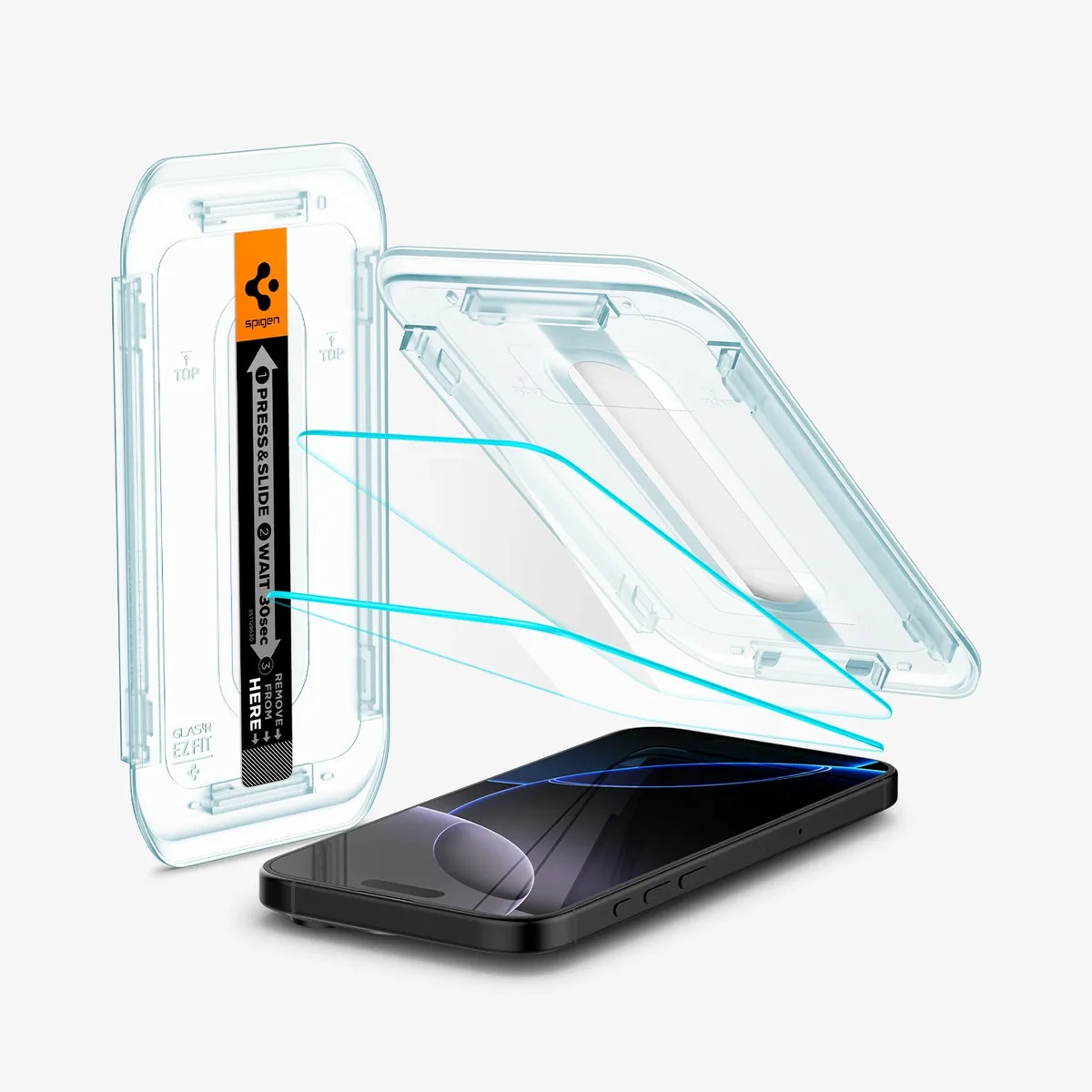
Spigen's GLAS.tR EZ Fit tray for the iPhone 16 Pro Max Clear variant, saved locally from Spigen product media.

Time to fit (stopwatch)
~40 seconds
Retries needed
None, with care
Glass thickness (claimed)
0.33 mm
  • Oleophobic layer keeps its glide feel noticeably longer
  • Chamfered edge cleared every case we tried, including thick MagSafe ones
  • Two-year manufacturer warranty against defects
  • You still do the dust removal yourself, with the supplied sticker
  • The tray wants a still hand and a clean room
Official 2-pack$19.99$16.99-15%

Check current pricing and availability before buying

Published specifications

Manufacturer-stated figures for the iPhone 16 Pro Max versions. We have not independently verified thickness or hardness.

SpecificationMagic John Auto-Dust BoxSpigen Glas.tR EZ Fit
Glass thickness0.33 mm0.33 mm
Stated hardness9H9H
Edge profile2.5D arc2.8D chamfer
Dust handlingBuilt into the cradleManual sticker + open frame
Speaker cutoutMesh guardOpen
Warranty1-year replacement2-year limited
List price (2-pack)$14.99$16.99

Read the full showdown

AI GPU Cloud for Builders
Pricing checked 4 Sep 2026

RunPod vs Lambda Labs vs Vast.ai: Which GPU Cloud Should AI Builders Rent?

Three ways to rent NVIDIA GPUs for AI work: RunPod's developer cloud, Lambda's polished on-demand instances, and Vast.ai's market-style GPU marketplace.

The Bottom Line (30-Second Verdict)

RunPod is the easiest default for indie AI builders who want both quick GPU pods and serverless inference in one account. Lambda is the safer-feeling pick when you want polished on-demand instances, minute billing and a more traditional cloud experience. Vast.ai is the price hunter's option: more control, more supply variety, and more responsibility to inspect each host before you trust it with production work.

Best default for builders

RunPod

AI developer cloud with Pods, Serverless endpoints, Clusters and templates

9.1/10

Best all-rounder

Main model
Dedicated Pods + Serverless GPU endpoints
Pricing style
Per-second GPU pricing; workload model changes the bill
Published H100 PCIe pod price
$2.89/hr snapshot
Published RTX 4090 pod price
$0.74/hr snapshot
Serverless idle cost
No idle cost when no requests are processed
  • One account covers quick development pods, API-driven serverless inference, multi-node clusters and ready templates
  • Serverless docs explain the real lifecycle: endpoints, workers, handler functions, cold starts and worker shutdown
  • The affiliate path fits the site honestly because RunPod is directly useful to AI developers
  • Published pricing exposes popular GPU snapshots from L4 and RTX 4090 up through H100, H200, B200 and B300
  • Storage, deployment choices and active workers can change the real bill beyond the headline GPU hourly rate
  • Serverless still asks you to package a Docker worker and understand cold starts
  • The cheapest-looking option is not always the right one once uptime, region, storage and queueing matter
RTX 4090 pod snapshot; H100 PCIe listed at $2.89/hr on 4 Sep 2026$0.74/hr+
Start on RunPod

Pricing changes by GPU, workload and availability

Best polished instance cloud

Lambda Cloud

On-demand NVIDIA GPU instances, 1-Click Clusters and AI infrastructure

8.7/10

Clean cloud experience

Main model
1x to 8x GPU instances, clusters and superclusters
Pricing style
Pay by the minute; no egress fees claimed by Lambda
Instance control
UI, API or CLI
Software stack
Lambda Stack deep-learning environment
Best fit
Teams that want a more conventional GPU cloud
  • The GPU Cloud page is built around simple instance rental: launch, train, fine-tune and serve models
  • Lambda states pay-by-the-minute pricing and no egress fees on the GPU Cloud page
  • API and CLI support make it a more automation-friendly traditional cloud than a pure console product
  • Cluster and supercluster products leave room to grow if a workload stops being a single-GPU experiment
  • The most attractive capacity can depend on what is available when you need it
  • Cluster pricing quickly moves into sales-led or longer-duration decisions
  • It is included as a benchmark competitor because many teams compare it against flexible GPU marketplaces
Official Lambda pricing page; rates vary by GPU and commitmentBy GPU
See Lambda pricing

Check the current page before choosing a plan

Best for price hunting

Vast.ai

Marketplace-style GPU cloud with real-time pricing and per-second billing

8.4/10

Most flexible market

Main model
GPU marketplace, on-demand, interruptible and reserved
Pricing style
Supply-and-demand pricing across providers
Published scale
20,000+ GPUs, 40+ data centers, 68+ GPU types
Minimum start
Vast says you can start with as little as $5
Best fit
Batch jobs, experiments and buyers who inspect hosts
  • Real-time marketplace pricing can be structurally cheaper when supply is good
  • On-demand, interruptible and reserved modes make sense for different workload risk profiles
  • CLI, Python SDK and API routes are visible first-class developer surfaces
  • The host marketplace gives more knobs for VRAM, model, region, price and availability
  • Marketplace flexibility means you must inspect reliability, host details and interruption risk yourself
  • The pricing page can show tiers and pricing model clearly even when live GPU cards are unavailable to the scraper
  • It is not the calmest first GPU cloud for someone who just wants a single safe production endpoint
Real-time rates vary by GPU, host and availabilityLive market
Check Vast.ai rates

Check the current page before choosing a plan

GPU cloud capability matrix

Published capabilities and pricing model language checked on 4 September 2026. This is not a performance benchmark.

CapabilityRunPodLambda CloudVast.ai
Fast dev instanceLambda is the most conventional; RunPod is nearly as direct.PodsGPU instancesGPU marketplace instances
Serverless inferenceRunPod explains endpoints, workers, handlers and cold starts clearly.Documented Serverless endpointsNot the core page focusServerless product listed
Marketplace price huntingVast.ai is built around supply-and-demand pricing.NoNoYes
Billing granularityRunPod and Vast.ai both win for second-level metering; Lambda wins for simplicity.Per-second pricingPay by the minutePer-second billing
Published RTX 4090 snapshotRunPod gave a readable RTX 4090 pod snapshot when checked.$0.74/hrNot the pricing-page focusLive market rate
Large cluster pathLambda has the clearest sales-to-cluster ladder.Clusters1-Click Clusters and SuperclustersClusters
Beginner friendlinessLambda is calmest if you just want a traditional instance.High for pods; medium for serverlessHigh for instancesMedium-low

Read the full showdown

AI 3D Generators
Docs checked 4 Sep 2026

Meshy vs Tripo vs Rodin: Which AI 3D Generator Should Creators Use?

Meshy, Tripo and Hyper3D Rodin compared for text-to-3D, image-to-3D, game assets, 3D printing, API workflows and export formats.

The Bottom Line (30-Second Verdict)

Meshy is the best default for most creators because it wraps text-to-3D, image-to-3D, texturing, animation, 3D printing and integrations into one approachable workflow. Tripo is the API-first pick when you care about controllable model-generation endpoints, credit math and post-processing. Hyper3D Rodin is the strongest alternate to evaluate if your priority is fast image/text-to-3D with a broad creative toolset and production-ready positioning.

Best default for creators

Meshy

Browser AI 3D generator for text, images, chat, printing, plugins and API

9.0/10

Most complete workflow

Meshy

Meshy marketing image showing example 3D characters and props, saved locally from Meshy product media.

Main inputs
Text, image, chat prompts
Exports stated by Meshy
GLB, FBX, OBJ, STL, USDZ, 3MF, BLEND
3D printing path
Print-focused workflow, slicer integrations
Developer path
REST API, CLI, MCP server, plugins
  • The public docs frame Meshy as an end-to-end workspace, not just a one-shot generator
  • Export coverage is broad enough for game engines, AR, DCC tools and 3D printing
  • The pricing FAQ explains commercial rights: premium users own assets; free-plan output is CC BY 4.0
  • Plugins and integrations make it easier to move from a generated asset into Blender, Unity, slicers and other tools
  • A credit/subscription system still needs checking before heavy production use
  • Marketing examples are strong, but this article did not run a side-by-side generation benchmark
  • Teams with strict API cost accounting may prefer Tripo's more explicit OpenAPI credit table
Meshy states free users get 100 credits per month; paid tiers vary by planFree plan
Start creating with Meshy

Verify current plan limits before production use

Best API control

Tripo AI

OpenAPI-focused text/image/multiview-to-3D with post-processing controls

8.7/10

Clear credit math

Main inputs
Text, image, multiview, imported model
API pricing basis
$1 = 100 credits; task costs listed in docs
Free API start
300 free credits in 2 weeks
Post-processing
Texture, mesh editing, smart low poly, rigging, retargeting, conversion
  • Official docs expose task-level credit costs, including text-to-model, image-to-model, multiview, texture, rigging and conversion
  • H3 documentation includes parameters for texture quality, PBR, smart low poly, quad remeshing and seeds
  • Conversion docs list GLTF, USDZ, FBX, OBJ, STL and 3MF targets with useful caveats
  • The platform is a strong fit when a developer wants repeatable API calls instead of a purely visual workflow
  • The public marketing site returned 403 to automated research, so this article relies on the official docs rather than storefront screenshots
  • The API docs are excellent, but less beginner-friendly than Meshy's creator-facing workspace
  • Credit surcharges for detailed texture, smart low poly, quad meshes and generated parts can complicate cost estimates
OpenAPI credit snapshot: text-to-model H2/H3 starts at 10 credits without texture, 20 with texture; P1 starts at 30-40 credits$1 / 100 credits
Open Tripo Studio

Pricing details from Tripo OpenAPI docs

Best direct alternate

Hyper3D Rodin

AI 3D model generator for image-to-3D, text-to-3D, API and creative add-ons

8.4/10

Broad creative suite

Hyper3D Rodin

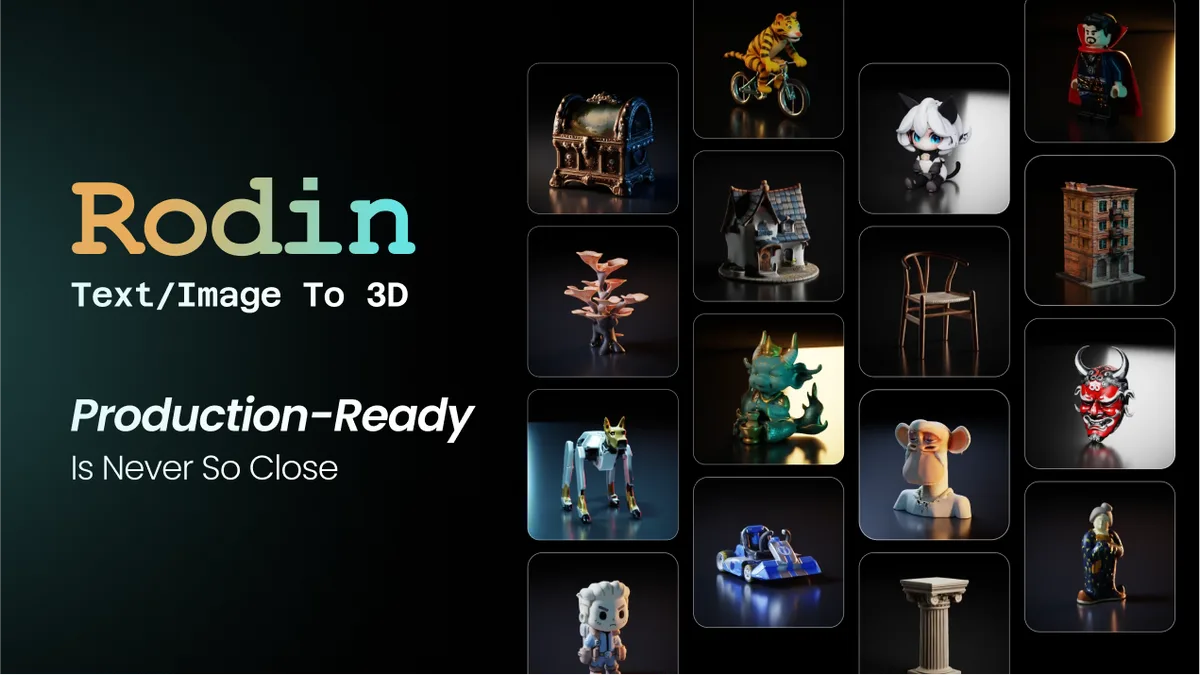
Hyper3D Rodin marketing image showing text/image-to-3D examples, saved locally from Hyper3D product media.

Main inputs
Image to 3D, text to 3D
Toolset
Rodin, API, texture, HDRI, mesh editor, model viewer
Plugins listed
Blender, Unity, Unreal, Godot, Maya and more
Plan framing
Free trial, Creator, Business, Enterprise
  • Rodin is a direct AI 3D generator, unlike broader image/video platforms that no longer clearly center 3D generation
  • The site lists image-to-3D, text-to-3D, API access and a large creative add-on set
  • Plugin coverage is attractive for teams that move assets into game and DCC pipelines
  • Business/Enterprise positioning may fit teams that need commercial licensing and production support
  • The pricing page is visually heavy and harder to parse by automation than Tripo's plain docs
  • The broad suite can feel less focused if all you need is one reliable model-generation workflow
  • It is a useful benchmark competitor, but the workflow can feel broader than a focused creator tool
Plans include Free trial, Creator, Business and Enterprise; check live page for current limitsFree trial
Compare Rodin plans

Check the current page before choosing a plan

AI 3D generator capability matrix

Published capabilities checked on 4 September 2026. This is not a quality benchmark; no identical prompt/image test was run.

CapabilityMeshyTripo AIHyper3D Rodin
Best default audienceMeshy is easiest to recommend first.Creators, game-dev prototypers, 3D printing hobbyistsDevelopers building API workflowsCreators evaluating a direct 3D-generation alternative
Text-to-3DAll three support it; Tripo exposes the most parameter detail in docs.YesYes, with H3/P1 model linesYes
Image-to-3DTripo's multiview route is useful for controlled input.YesYes, with single-image and multiview routesYes
3D printing emphasisMeshy talks most directly to makers and slicer workflows.Strong: STL/3MF, slicer integrations, printability languagePossible through exportsUse-case listed
API cost clarityTripo wins if you need to estimate API calls.Plan/credit FAQTask-level credit tablePlan-based pricing page
Commercial-use clarityMeshy's FAQ is the clearest public wording found.Premium ownership; free output under CC BY 4.0 per FAQCheck account terms for project-specific useBusiness tier says commercial license included
Why Luma is not hereLuma's current public site is focused on image/video agents and APIs, so Rodin is a cleaner 3D contender.Direct AI 3D focusDirect AI 3D/OpenAPI focusDirect AI 3D focus

Read the full showdown

AI Fullstack App Builders
Pricing checked 3 Sep 2026

Emergent.sh vs Bolt.new vs Cursor: Which One Actually Ships a Fullstack App?

Three very different answers to 'build me an app'. We compare where the code lives, what you actually pay, and which one survives contact with a repository you already own.

The Bottom Line (30-Second Verdict)

Cursor is the only one of the three that behaves well inside a repository you already own, which makes it the default for anyone maintaining real software. Emergent.sh is the shortest path from a sentence to something deployed at a URL you can send to someone, so it wins for validating an idea you have not built yet. Bolt.new is the best zero-install browser sandbox — excellent for a demo, awkward the moment you need a backend you control.

Best for real codebases

Cursor

AI-first VS Code fork with repository-wide context

9.0/10

Best on existing repos

Where your code runs
Your own machine
Opens an existing repo
Yes, it is an editor
Free tier
Hobby, limited agent requests
Entry paid tier
$20/mo (Pro)
  • It is a real editor, so nothing about your existing project has to change
  • Agent edits land as ordinary file changes you can read in git before committing
  • Team plans add shared rules and centralised billing without changing the local workflow
  • No preview-and-deploy story at all — you still own hosting, CI and secrets
  • Usage-pool pricing means a heavy month costs more than the sticker $20
  • Steeper start if you have never used VS Code
Pro list price, September 2026$20/mo
See Cursor pricing

Check the current page before choosing a plan

Fastest idea to live URL

Emergent.sh

Prompt-driven agent that scaffolds, hosts and deploys the whole stack

8.3/10

Deploys itself

Where your code runs
Emergent's hosted environment
Opens an existing repo
Not its use case
Free tier
Yes, small monthly credit grant
Entry paid tier
~$20/mo, credit-metered
  • Provisions database, auth and hosting without you configuring any of it
  • The output is a reachable URL, not a folder you still have to deploy
  • By far the least intimidating of the three for a non-developer founder
  • Credit metering makes cost genuinely hard to predict before you start
  • You are buying into its stack choices; migrating out later is real work
  • Weakest option once the app is big enough to need careful refactoring
Indicative — vendor pricing page did not load when checked$20/mo
Check Emergent pricing

Confirm the current tier at checkout

Best browser sandbox

Bolt.new

WebContainer sandbox that runs Node and Vite in the browser tab

7.9/10

Nothing to install

Where your code runs
In your browser (WebContainer)
Opens an existing repo
Import, but frontend-shaped
Free tier
1M tokens/mo, 300K daily cap
Entry paid tier
$25/mo (Pro), 10M tokens
  • Genuinely nothing to install — a browser tab is the whole dev environment
  • Unused Pro tokens roll over to the following month
  • The npm ecosystem works normally, which is rarer in browser IDEs than it sounds
  • Backend and database still need an external service you wire up yourself
  • Token metering punishes long iterative sessions
  • The most expensive entry tier of the three at list price
Pro list price, September 2026$25/mo
See Bolt pricing

Check the current page before choosing a plan

Capability matrix

Published capabilities and pricing as of 3 September 2026. This landscape moves monthly — re-check before you commit a team to one.

CapabilityCursorEmergent.shBolt.new
Runs locallyYesNoNo
Works on a large existing repoYesNot designed for itImport, limited
Provisions a database for youNoYesExternal service
One-click deploy to a live URLNoYesHosting included
Zero local setupInstall requiredBrowser onlyBrowser only
Free tierHobbySmall credit grant1M tokens/mo
Entry paid tier (list)$20/mo~$20/mo$25/mo
Team plan (list)from $40/user/moTeam tier available$30/member/mo

Read the full showdown

AI Shorts Tools
Pages checked 7 Sep 2026

Korpi AI vs OpusClip vs InVideo: Which AI Shorts Tool Is Best for Faceless Channels?

Korpi AI, OpusClip and InVideo compared for faceless shorts, long-form repurposing, prompt-to-video, AI voiceovers, captions, scheduling and creator workflows.

The Bottom Line (30-Second Verdict)

Korpi AI is the most focused pick for faceless short-form channels because it starts from viral formats, templates, niches and automation instead of a blank timeline. OpusClip is better when you already have long videos and need AI clipping, captions, reframing and scheduling. InVideo is the stronger full-video generator when you want prompt-to-video with scripts, visuals, voiceovers, subtitles and modern video models in one workspace.

Best faceless-shorts focus

Korpi AI

Faceless viral-short generator with templates, niches, trends, repurposing and automation

8.9/10

Template-first

Best use
TikTok, YouTube Shorts and Reels-style faceless clips
Workflow surface
Trends, Repurpose, Niche Maker, Automate, MCP
Creative inputs
Templates, niches, voiceovers, AI clip formats
Affiliate program text
35% commission shown on public page
  • More focused on faceless short-form formats than a general video editor
  • Public pages surface niche/template ideas such as Reddit stories, quizzes, fake-text videos and social short formats
  • Repurpose and Automate positioning fits creators trying to publish repeatable short-form content
  • The product is the cleanest match for this article’s faceless short-form angle
  • Public pricing details are harder to extract from app-rendered pages than OpusClip or InVideo
  • The article did not test whether generated clips actually go viral, so no virality or revenue guarantee is implied
  • Creators who already have podcasts, webinars or talking-head footage may get more immediate value from OpusClip
Korpi pricing page was checked, but detailed plan text is app-rendered; verify current limits in account before buyingCheck live pricing
Try Korpi AI

Best for creators testing repeatable short-form formats

Best for repurposing

OpusClip

AI long-form-to-short clipping tool with captions, reframing, editor and social scheduling

8.6/10

Clip extraction

Best use
Turning existing long videos into Shorts/Reels/TikToks
Starter snapshot
$15/mo, 150 credits per month
Pro annual snapshot
$174 billed annually, 3,600 credits per year
Publish path
Auto post to YouTube Shorts, TikTok, IG Reels or download
  • The pricing page states AI clipping with Virality Score, AI animated captions and social auto-posting
  • Strong fit for podcasts, webinars, livestreams, interviews and creator channels with existing source footage
  • Includes editor features such as reframing, filler/silence removal, brand templates and watermark-free export on paid plans
  • Has an affiliate program page, though this article does not have the user's OpusClip referral URL
  • It is strongest after you already have long-form footage; it is not the cleanest blank-page faceless-video generator
  • Credit and pack math can matter if you produce at agency volume
  • Some marketing claims on the page are customer-outcome oriented, so this article does not treat them as guaranteed results
Pricing page snapshot: Starter $15/mo with 150 credits/month; Pro annual page text showed $174/year and 3,600 credits/year$15/mo starter
Compare OpusClip plans

Check the current page before choosing a plan

Best full-video generator

InVideo AI

Prompt-to-video agent that writes scripts, adds visuals, voiceovers, subtitles, music and transitions

8.4/10

Prompt-to-video

Best use
Generating complete videos from a prompt
Plus annual snapshot
$17/mo billed yearly, 750 credits/mo
Models listed
Seedance 2.5, Veo 3.1, Kling 3
Included workflow
Script, AI visuals, voiceovers, subtitles, music, transitions
  • The AI video generator page clearly describes prompt-to-video with script, visuals, voiceovers, subtitles, music and transitions
  • Pricing page lists access to modern AI models and AI workflows, which makes it broader than a clipper
  • Good fit for marketers and creators who want to generate the whole video rather than extract highlights from existing footage
  • Unlimited exports without watermark are listed on paid pricing tiers checked for this snapshot
  • Less specialized than Korpi for faceless viral-short templates and niche formats
  • More expensive once you move beyond occasional use; higher tiers jump quickly
  • Model/credit systems change often, so exact production cost needs a live account check
Pricing page snapshot: Plus $17/mo billed yearly with 750 credits/mo; higher tiers add credits, storage and concurrency$17/mo yearly Plus
Compare InVideo plans

Check the current page before choosing a plan

AI shorts workflow matrix

Published pages checked on 7 September 2026. This is a workflow comparison, not a claim that any tool guarantees views, revenue or virality.

CapabilityKorpi AIOpusClipInVideo AI
Best default audienceKorpi is the sharpest match for the article's faceless-channel angle.Faceless short-form creators testing nichesCreators with existing long-form footageCreators/marketers generating complete videos from prompts
Primary workflowKorpi starts closest to the repeatable shorts factory model.Templates, niches, trends, repurpose, automateAI clipping, captions, reframing, schedulingPrompt writes script and assembles video
Existing footage repurposingOpusClip is the cleaner pick for podcasts, webinars and streams.Repurpose feature surface listedCore product strengthPossible, but not the main differentiator
Blank-page video generationInVideo is broader for full prompt-to-video.Short-format generationNot the main use caseCore product strength
Social publishingOpusClip has the clearest public auto-post wording in the checked pages.Automation positioningAuto post to Shorts, TikTok, IG Reels or downloadExport and publish workflow; details vary by plan
Pricing clarity from public pagesOpusClip and InVideo expose cleaner public plan snapshots than Korpi's app-rendered page.Feature text visible; detailed plan text harder to parse$15/mo Starter; Pro annual snapshot visible$17/mo Plus annual snapshot visible
Affiliate monetization for this siteKorpi is the strongest match for a faceless-short workflow.User referral link availableNo user referral link availableNo user referral link available

Read the full showdown

AI Developer CLI & Agentic Workflows
Landscape checked 3 Sep 2026

Claude Code vs OpenAI Codex: Which Coding Agent Belongs in Your Daily Workflow?

Two terminal-first coding agents, one workflow decision. How each handles a repository you care about, what happened to Canvas and the o-series, and which one to put in front of a team.

The Bottom Line (30-Second Verdict)

Claude Code is the better companion for a long session inside one repository you care about — it is calmer about large context, and its permission model makes it safe to leave running. Codex is the better tool for handing a task off and walking away, because OpenAI ships a cloud agent alongside the CLI and the CLI itself is open source. The old framing of this fight — Canvas and the o-series — is out of date: Canvas is being retired from OpenAI's newest models, and the o-series has been folded into GPT-5-generation thinking modes.

Editor's pick for a daily driver

Claude Code

Terminal-native agent that reads, edits and runs your project

9.2/10

Best long-session behaviour

Primary surface
Your terminal (plus IDE and desktop apps)
Install
Native installer, Homebrew, WinGet, apt/dnf/apk or npm
Account required
Pro, Max, Team, Enterprise or API
Entry price
$20/mo (Claude Pro)
Source
Closed source
  • Agentic search means you do not hand-pick which files it may look at
  • Per-tool permission prompts make it genuinely safe to leave running on a real repo
  • Installs cleanly outside npm — native installer, Homebrew, WinGet and signed apt/dnf/apk repositories
  • Project-level CLAUDE.md and settings let a team standardise agent behaviour in version control
  • Not available on the free Claude plan at all — Pro or above, or metered API
  • Long agent sessions burn plan limits quickly; the $20 tier runs out faster than people expect
  • Closed source, so you cannot audit or fork the agent loop
Claude Pro list price · Max tiers at $100 and $200/mo$20/mo
Read the setup docs

Official product page with current details

Best delegated runs

OpenAI Codex

Open-source CLI, IDE extension and a cloud agent that runs tasks for you

8.7/10

Strongest cloud handoff

Primary surface
Terminal, IDE extension and cloud
Install
npm i -g @openai/codex
Account required
ChatGPT Plus and above, or API
Entry price
$20/mo (ChatGPT Plus)
Source
Apache-2.0, open source
  • The CLI is genuinely open source, so you can read the loop and pin your own build
  • A cloud agent runs longer tasks without holding your laptop hostage
  • Included in a ChatGPT subscription many teams already pay for
  • IDE extension covers people who will never live in a terminal
  • Not on the cheapest ChatGPT tier — the entry Go plan excludes Codex
  • Three surfaces means three slightly different behaviours to learn
  • Cloud delegation is only as good as the environment definition you give it
ChatGPT Plus list price · Pro tier at $200/mo$20/mo
Read the Codex CLI docs

Official documentation for setup details

Workflow matrix

Published capabilities as of 3 September 2026. Both products ship weekly — verify anything you are about to standardise a team on.

CapabilityClaude CodeOpenAI Codex
Runs in a plain terminalYesYes
Open source clientNoYes (Apache-2.0)
Cloud agent for delegated tasksNoYes
Installs without Node.jsYesnpm required
Signed OS package repositoriesapt, dnf, apk, Homebrew, WinGetnpm
Per-tool permission promptsYesApproval modes
Repo-level config in version controlCLAUDE.md + settings.jsonAGENTS.md + config
Included on vendor free tierNoNo
Entry subscription (list)$20/mo Claude Pro$20/mo ChatGPT Plus

Read the full showdown

Esports Gaming Mice
Manufacturer specs, Sep 2026

Logitech G Pro X Superlight 2 vs Razer Viper V3 Pro: Which Wireless Esports Mouse?

Two 54-to-60 gram flagships at the same list price, with near-identical published specs. The decision comes down to shape and switch feel, not the spec sheet — here is how to tell which one fits your hand.

The Bottom Line (30-Second Verdict)

On paper these two are a tie — same $159.99 list price, same published 8,000 Hz ceiling, same published 95-hour battery figure. The Superlight 2's symmetrical hump suits the widest range of hands and grips, which makes it the safer buy if you cannot try before you buy. The Viper V3 Pro is six grams lighter with a flatter back and ships its 8K HyperPolling dongle in the box, so it is the better pick if you already know you like a low, flat shape.

Safest buy for most hands

Logitech G Pro X Superlight 2

60 g symmetrical flagship with LIGHTFORCE hybrid switches

9.1/10

Broadest shape appeal

Weight (published)
60 g
Sensor (published)
HERO 2, up to 44,000 DPI
Switches
LIGHTFORCE hybrid optical-mechanical
Max report rate (published)
Up to 8,000 Hz LIGHTSPEED
Battery (published)
Up to 95 h
  • The symmetrical, gently humped shell is the closest thing to a universal esports shape
  • Hybrid optical-mechanical switches keep a tactile click feel that pure optical switches lose
  • USB-C charging and POWERPLAY mat compatibility if you never want to think about battery
  • Enormous install base means grip tape, skates and shells are easy to find
  • Six grams heavier than the Razer, which is noticeable in a flick-heavy game
  • The 8,000 Hz figure depends on which SKU and receiver you buy — check the box
  • No grip tape included at this price
Logitech list price · commonly discounted at retail$159.99
See Logitech's specs

Manufacturer product page with current product details

Highest performance ceiling

Razer Viper V3 Pro

54 g flat-backed esports mouse with the HyperPolling dongle in-box

9.0/10

Lightest of the two

Weight (published)
54 g (55 g white)
Sensor (published)
Focus Pro 35K Gen-2, 35,000 DPI
Switches
Optical Gen-3, 90 M click rating
Max report rate (published)
8,000 Hz via bundled dongle
Battery (published)
Up to 95 h at 1,000 Hz
  • Six grams lighter than the Logitech at 54 g published weight
  • The HyperPolling Wireless Dongle is in the box, so 8,000 Hz needs no extra purchase
  • Flatter back and more pronounced sides suit claw and fingertip grips
  • Grip tape included, and Razer publishes battery figures at each polling rate
  • Razer's own numbers show battery falling to roughly 17 h at 8,000 Hz
  • Pure optical switches feel lighter and less tactile than Logitech's hybrids
  • The flat rear gives palm-grip users less to rest against
Razer list price · frequently on promotion$159.99
See Razer's specs

Manufacturer product page with current product details

Published specification matrix

All figures are the manufacturers' own published specifications, read from logitechg.com and razer.com on 3 September 2026. Hoang Hiep has not independently measured latency, sensor accuracy or battery life.

SpecificationLogitech G Pro X Superlight 2Razer Viper V3 Pro
Weight60 g54 g (55 g white)
ShapeSymmetrical, gentle humpSymmetrical, flatter back
SensorHERO 2Focus Pro 35K Gen-2
Max DPIUp to 44,00035,000
Max tracking speed888+ IPS750 IPS
SwitchesLIGHTFORCE hybrid, 70 M clicksOptical Gen-3, 90 M clicks
Max wireless report rateUp to 8,000 Hz8,000 Hz
8K receiver includedCheck SKUYes, in-box
Battery, headlineUp to 95 hUp to 95 h at 1,000 Hz
ChargingUSB-C, POWERPLAY compatibleUSB-C
List price$159.99$159.99

Read the full showdown

Your first business automation
Documentation reviewed 18 Sep 2026

Zapier vs Make vs n8n: Which Fits Your First Business Workflow?

Compare Zapier, Make and n8n for a customer-inquiry workflow: billing units, follow-up ownership, duplicate leads and the maintenance behind a cheap plan.

The Bottom Line

Start with Zapier if familiar app connections and a simple handover matter most. Choose Make if you want to see and adjust branching logic on a visual canvas. Choose n8n when someone can own the technical details; use Cloud if you do not want to own a server. For a first lead workflow, a named maintainer matters more than a long feature list.

Simple handover

Zapier

My first shortlist for a nontechnical owner

  • Built-in Forms and Tables can keep the first workflow in one place
  • Several built-in logic and data tools do not consume tasks
  • The Free plan limits a Zap to two steps
  • External action volume can push you into a larger task tier
Visual branching

Make

My shortlist for someone who thinks in flowcharts

  • Visual scenarios make the route through a process explicit
  • Module-level usage helps identify expensive parts of a flow
  • A credit is not always one lead or even one operation
  • The owner must understand bundles, routes and failure handling
More technical control

n8n

My shortlist when a technical maintainer is available

  • Cloud pricing counts workflow executions rather than each step
  • Community edition offers a self-hosted route for eligible uses
  • Self-hosting adds infrastructure and security work
  • Custom authentication and APIs still need a technical owner

Read the full showdown

Master benchmark matrix

Every showdown, one table

The winner, the runner-up and the single measurement that decided each head-to-head.

Winner column

Showdown & productsWinnerRunner-upDeciding factorPrice deltaQuick action
Developer AgentsGLM Coding Plan vs Claude Code vs OpenAI CodexClaude Code9.1 / 10 · best everyday experienceOpenAI Codex8.8 / 10 · best if you want the OpenAI stackClaude Code feels the most polished to live with, while GLM makes the strongest value case and Codex is the safest enterprise-style alternativeGLM starts at $18/month; Claude and OpenAI pricing vary by account and regionCheck GLM Coding Plan
Phones & GlassMagic John Auto-Dust Proof Box vs Spigen Glas.tR EZ FitMagic John Auto-Dust9.2 / 10Spigen EZ Fit9.0 / 10The cradle does the dust removal for you; the Spigen tray leaves it to your hands$2.00 cheaperSee Magic John price
AI SaaS & CodeRunPod vs Lambda Cloud vs Vast.aiRunPod9.1 / 10 · best all-rounderLambda Cloud8.7 / 10 · clean instance cloudRunPod combines quick GPU pods with a documented serverless path; Lambda is cleaner for plain instances, while Vast.ai asks for more buyer diligenceRunPod RTX 4090 snapshot: $0.74/hrStart on RunPod
AI SaaS & CodeMeshy vs Tripo AI vs Hyper3D RodinMeshy9.0 / 10 · best creator defaultTripo AI8.7 / 10 · best API controlMeshy has the broadest creator workflow, while Tripo is clearer for API billing and Rodin is the best direct third benchmarkMeshy free plan; Tripo API starts from creditsStart creating with Meshy
AI SaaS & CodeCursor vs Emergent.sh vs Bolt.newCursor9.0 / 10 · existing reposEmergent.sh8.3 / 10 · new projectsCursor edits code you already own; Emergent only shines when it owns the whole stackBoth $20/mo at entryCompare pricing
AI SaaS & CodeKorpi AI vs OpusClip vs InVideo AIKorpi AI8.9 / 10 · best faceless-shorts focusOpusClip8.6 / 10 · best existing-footage repurposerKorpi starts closest to niche-driven faceless shorts, while OpusClip wins for long-form repurposing and InVideo wins for full prompt-to-videoKorpi live pricing needs account check; OpusClip starts at $15/mo and InVideo Plus annual at $17/mo in checked pagesTry Korpi AI
Developer AgentsClaude Code vs OpenAI CodexClaude Code9.2 / 10 · daily driverOpenAI Codex8.7 / 10 · delegated workClaude Code is better company inside one repo; Codex is better at taking a task away and finishing it elsewhereBoth from $20/moRead the setup docs
Gaming GearLogitech G Pro X Superlight 2 vs Razer Viper V3 ProLogitech G Pro X Superlight 29.1 / 10 · fits more handsRazer Viper V3 Pro9.0 / 10 · lighter, 8K in-boxShape and switch feel decide this, not the spec sheet — both publish 8,000 Hz and 95 hours at the same $159.99Identical $159.99 list priceCompare shapes side by side

How we test, and how we make money

We buy the units we test at retail, with our own budget. We do not accept vendor-supplied samples, paid placements or sponsored reviews, and no brand sees a verdict before it is published.

Many of the buy links on this page are affiliate links: if you purchase through one, we may earn a commission at no extra cost to you. That commission never decides which product wins — the measurements do.

Read the full testing methodology